
Let me be direct with you: most insurance agents who try YouTube quit after three videos because they have no idea what they're doing wrong.
They record a policy explainer, upload it with a generic title, and then wonder why nobody is calling them. The problem is not the product they're selling. It is the entire approach to insurance youtube marketing — what to say, how to frame it, and what to do with viewers after they watch.
I have spent the last two years working with independent agents and agencies who generate 15 to 40 qualified calls per month from YouTube alone. They do not have millions of subscribers. Most of them have between 800 and 8,000 subscribers. What they have is a content system that attracts high-intent prospects and moves them toward a real conversation.
This guide is that system, written out in full.
Important
Quick answer: Insurance YouTube marketing works best when you lead with the customer's problem rather than the product. Educational videos that answer real questions (like "when does my homeowner's policy NOT cover me") consistently outperform promotional videos and attract leads who are already pre-sold on needing help.
---
Why YouTube Works So Well for Insurance (and Why Most Agents Blow It)
Here is something your competitors probably do not realize: YouTube is a search engine, not a social network. When someone types "do I need life insurance if I'm single" into YouTube, they are not browsing for entertainment. They are looking for an answer, and often, a person they trust to help them act on that answer.
Insurance has one of the highest CPMs on YouTube — regularly ranging from $25 to $80+ per 1,000 views — precisely because advertisers know these viewers have genuine intent. That same intent works in your favor as an insurance agent, because you are not trying to reach millions of random people. You are trying to reach 50 to 200 people per month in your state or niche who are actively thinking about buying coverage.
That is a very achievable number with a consistent YouTube strategy.
The mistake most agents make is treating YouTube like a brochure — recording a video about their agency, listing their products, and wondering why no one calls. Viewers do not want a brochure. They want answers to questions that are bothering them right now.
If you want to understand how YouTube's algorithm rewards content that genuinely helps people, the YouTube Algorithm 2026 Guide breaks down exactly what signals matter for growth.
---
The Three Video Types That Drive Insurance Leads
Every insurance YouTube channel that generates real leads uses some version of these three formats. You do not need all three from day one, but understanding each one helps you build a channel that works at every stage.
1. The Question-Answer Video (Your Workhorse)
This is your highest-volume format and your most consistent lead source. You identify a real question your ideal client is searching for, record a clear 5 to 10 minute answer, and include a call to action at the end that leads to a consultation or quote form.
Examples of questions that perform well:
- "Does renters insurance cover my laptop if it gets stolen?"
- "What is the difference between term and whole life insurance?"
- "At what age should I get life insurance?"
- "Does my health insurance cover out-of-state emergencies?"
- "What happens to my life insurance if I switch jobs?"
Notice something about these questions. None of them are about your agency. They are all about the viewer's situation. That is the key shift that separates agents who get leads from agents who get nothing.
For help finding the best angles on insurance topics your audience is actually searching for, use the YouTube Title Generator to test different title formulations and see which approach is most likely to pull clicks.
2. The Comparison or Review Video (Your Trust Builder)
Comparison videos work exceptionally well in insurance because people are trying to decide between options and they do not trust salespeople to give them honest answers. When you appear on camera and say "here is how Term life insurance and Whole life insurance are actually different, including the parts most agents don't tell you," you immediately become the most credible person in the room.
Topics that convert well in comparison format:
| Comparison topic | Buyer intent level |
|---|---|
| Term vs Whole Life Insurance | Very high — person is ready to buy |
| HMO vs PPO Health Insurance | High — usually tied to open enrollment |
| Liability Only vs Full Coverage Auto | High — recent car purchase or renewal |
| Renters vs Homeowners Insurance | Medium-high — major life change |
| State Farm vs Progressive vs Allstate | High — person shopping and comparing |
These videos attract viewers who are already in the decision stage. They are not just curious — they are about to act.
3. The Case Study or Story Video (Your Closer)
This is the most underused format in insurance YouTube marketing, and it is often the one that gets someone to finally pick up the phone. A case study video tells a real or composite story of how a client situation played out, including what coverage helped them, what would have happened without coverage, or how they found the right policy.
A good title for this format:
- "Why I switched from bare-minimum auto coverage to full protection (real numbers)"
- "What a $500,000 life insurance policy actually looks like in real life"
- "A client got a cancer diagnosis three months after buying life insurance. Here's what happened."
You do not have to reveal private client information. You can use composite examples, general scenarios, or hypothetical illustrations as long as you are transparent about it. The point is not legal accuracy in case specifics — the point is making the abstract feel real.
---
Setting Up Your Insurance YouTube Channel the Right Way
Before you record a single video, you need to get the channel basics right. These are the decisions that affect whether someone trusts you enough to call after watching.
Channel name: Your real name, your agency name, or a name that signals what you do clearly. "The Life Insurance Guy" works. "JohnSmithInsurance" works. A vague brand name that says nothing about insurance makes it harder for viewers to immediately understand who you are.
Channel description: Open with your specialty, your location if you serve a local market, and what viewers will learn. Something like: "I'm an independent insurance agent in Phoenix, AZ. I post honest, jargon-free videos about life, auto, and home insurance so you can stop guessing and start making decisions."
Channel art and profile photo: Use a clean headshot with a professional but approachable look. If you are recording videos regularly, the channel art should feel consistent with how you look on camera. Use the YouTube Banner & Logo Maker to create a channel banner that looks polished without requiring a graphic designer.
About section: Include your contact information, a link to your website or quote form, and the states you are licensed in. This matters because YouTube's algorithm uses these signals, and viewers looking for a local agent will check before calling.
---
Insurance YouTube Marketing: The Content Calendar That Works
One of the most common questions I get from insurance agents is how often they need to post. Here is the honest answer: consistency beats frequency. One strong video per week is dramatically better than four weak videos in a week and then nothing for two months.
A sustainable insurance YouTube content calendar looks like this:
| Week | Video type | Example topic |
|---|---|---|
| Week 1 | Question-Answer | "Does renters insurance cover water damage?" |
| Week 2 | Comparison | "Term life vs Whole life: which one is right for you in 2026?" |
| Week 3 | Question-Answer | "Can I have two health insurance plans at the same time?" |
| Week 4 | Case Study | "A family I worked with had no life insurance. This is what happened." |
Rotate through the three formats on a monthly cycle. After three months of consistent posting, your channel starts developing a content library that generates search traffic on its own — even on weeks when you do not post.
To build this calendar efficiently so you are not starting from scratch each week, use the YouTube Content Calendar Generator. It helps you plan several weeks of topics in one session rather than scrambling for ideas before every recording.
---
Optimizing Your Videos for Search: The Insurance SEO Layer
A great video nobody finds is not useful. YouTube SEO for insurance is actually easier than most other niches because the competition at the video level is relatively low. Most insurance companies are investing in Google Ads, not YouTube. That gap is your opportunity.
Here is the optimization stack for each video:
Title: Lead with the question or problem. "Term Life Insurance Explained (in Plain English)" outperforms "Life Insurance Video" in every metric that matters.
Description: Write 200 to 400 words in the video description that naturally cover the main points of the video. Include the primary keyword in the first two sentences. Add timestamps for longer videos. Include a link to your quote page or calendar booking tool.
Tags: Use specific tags like "life insurance explained," "term life insurance 2026," "[your state] life insurance agent," and the main question title of your video. Use the YouTube Tag Generator to find related tags that are actually driving search traffic in your niche.
Thumbnail: The thumbnail is the single most important factor in whether someone clicks. For insurance content, the best thumbnails follow a simple formula: your face showing a clear expression (curiosity, concern, or confidence), bold readable text with the core benefit or question (e.g., "What they DON'T tell you"), and a clean contrasting background.
The AI Thumbnail Prompt Generator generates ready-to-use prompts you can take to any AI image tool to create insurance-specific thumbnails that feel polished and professional without needing design skills.
Hashtags: Add 3 to 5 targeted hashtags in the description such as #insurancetips, #lifeinsurance, #insuranceagent, #financialeducation, and one geographic hashtag if you serve a local market.
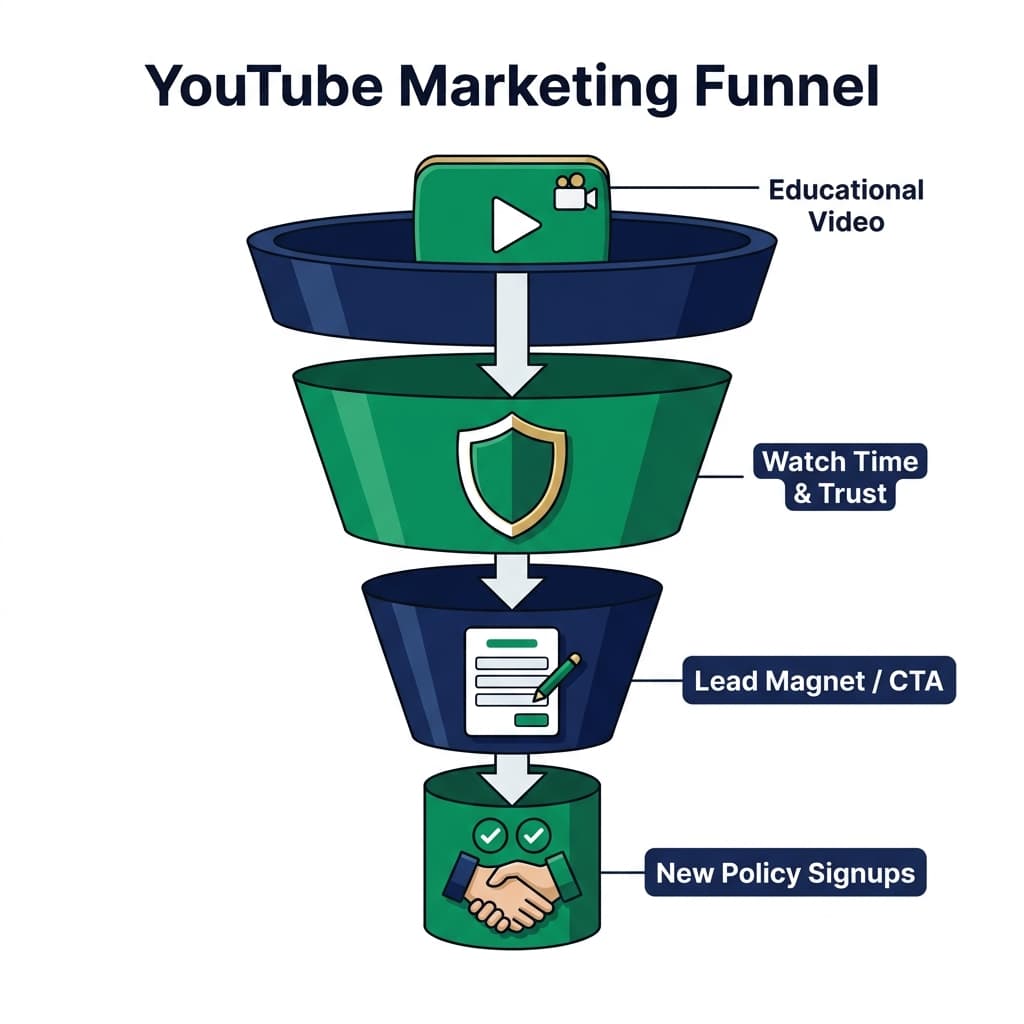
A visual diagram showing the insurance YouTube marketing funnel — from educational video at the top, through watch time and trust in the middle, to lead capture and policy signups at the bottom — with navy blue and emerald green design elements
*The insurance YouTube funnel works because it builds trust before asking for anything. Viewers who find your video through search are already looking for an answer — your job is to give them one and show them the next step.*
---
The Call to Action That Actually Gets Insurance Leads
This is where most insurance YouTube videos completely fall apart. The video ends, and the creator either says nothing or gives a vague "if you have any questions, contact me" line that nobody ever acts on.
The CTA section of your video (usually the last 60 to 90 seconds) should do three things:
- Summarize what they now know — briefly recap the main point so it sticks.
- Identify who should act — "if you are between 30 and 50 and have a family depending on your income, you really should have this conversation."
- Make the specific next step obvious — "click the link in my description to book a free 20-minute call. No pressure, no sales pitch, just an honest conversation about what makes sense for your situation."
That last part — "no pressure, no sales pitch" — matters enormously in insurance because the number one reason people avoid talking to agents is that they expect to be sold to aggressively. When you pre-empt that objection in the video, your booking rate goes up significantly.
For agents who use a lead magnet (a free guide, a policy checklist, or a coverage review worksheet), YouTube is a very effective top-of-funnel driver. The video attracts the viewer, the lead magnet captures their email, and the email sequence does the follow-up work.
---
Geographic and Demographic SEO for Insurance Agents
If you serve a specific state or region, geographic targeting dramatically increases the quality of your leads. Someone in Texas watching a video about Texas auto insurance minimums is a significantly warmer lead than someone from a different state watching a generic insurance video.
Here is how to build geographic signal into your YouTube presence:
- Include your state and major cities in your channel description
- Use your state name in video titles where natural: "Texas Auto Insurance Requirements Explained"
- Mention geographic specifics in your video intro: "I'm a licensed agent in California, and today I'm talking about..."
- Add your city and state to your About page and in video descriptions
If you serve multiple states or have a fully remote agency, you can create a series for each state you are licensed in. "Life Insurance Guide for [State] Residents" is a reproducible format that creates a different video for each of your markets without needing to reinvent the approach each time.
For understanding how YouTube's algorithm distributes your content geographically, the YouTube SEO Checklist 2026 has a practical section on optimizing for regional search.
---
YouTube Shorts for Insurance: Quick Wins That Feed Your Main Channel
Insurance Shorts are one of the most underrated lead generation shortcuts in 2026. A 45-to-60-second Short that answers one tight question — "can your employer cancel your life insurance if you quit?" — can rack up thousands of views in 24 to 48 hours and push viewers directly to your longer videos and channel.
The best Shorts for insurance are answers to binary questions where the answer surprises people:
- "Does health insurance automatically cover your spouse? (The real answer)"
- "Can you have car insurance in a different state than your car is registered?"
- "Life insurance after 60: is it too late?"
These work because the question itself creates a knowledge gap that the viewer wants to close. They watch the Short, get a satisfying answer, and often click through to your full video on the same topic.
For a deeper look at how to structure short-form content, the YouTube Shorts Domination Guide 2026 covers the production and optimization side in full detail.
Use the YouTube Shorts Script Planner to structure your insurance Short scripts so they are tight, engaging, and end with a clear hook back to your main channel.
---
Monetization and CPM Reality for Insurance Channels
Here is something most "YouTube marketing for insurance" content skips over: if you also enable AdSense monetization on your channel, insurance content is among the most lucrative for ad revenue on the entire platform.
Legal and insurance content regularly pulls $30 to $80+ CPM in the United States, United Kingdom, Canada, and Australia. A channel with 50,000 monthly views in the insurance niche can generate $2,000 to $5,000 per month in AdSense revenue alone — on top of the commission income from clients who find you through the channel.
That dual revenue stream — ad income and client conversions — is why building an insurance YouTube channel is one of the better business decisions an agent can make in 2026.
Use the YouTube Earnings Calculator to model out what your channel could earn from AdSense at different subscriber and view milestones. It supports country-specific CPM estimates, so you can see the real numbers for your primary market.
The High CPM YouTube Niches Guide 2026 gives a detailed breakdown of why insurance earns such premium ad rates and how to structure content that maximizes that revenue.
---
Tools That Save You Hours Every Week
An insurance agent running a YouTube channel is already stretched thin. These tools remove the grunt work:
| Task | Tool |
|---|---|
| Video topic ideas | YouTube Video Ideas Generator |
| Title writing and testing | YouTube Title Generator |
| Video description writing | YouTube Description Generator |
| Tag research | YouTube Tag Generator |
| Hashtag research | YouTube Hashtag Generator |
| Thumbnail prompts | AI Thumbnail Prompt Generator |
| Channel branding | YouTube Banner & Logo Maker |
| Shorts script writing | YouTube Shorts Script Planner |
| Earnings estimation | YouTube Earnings Calculator |
Using these tools consistently cuts your pre-production and post-production time in half, which means you can spend more of your week on what actually builds the business — filming and responding to leads.
---
The Backlink Strategy for Your Insurance YouTube Channel
Backlinks to your YouTube channel and blog content come from other websites linking to you. They cannot be self-created — they have to be earned. But insurance is a niche where several reliable backlink sources exist if you approach them the right way.
Personal finance and consumer advice sites: Sites like NerdWallet, Investopedia, and The Balance regularly link to expert video content in their insurance explainer articles. Create a genuinely excellent video on a topic like "what happens when you file a home insurance claim" and pitch it as a supplementary resource to editors.
State insurance regulator resources: Many state department of insurance websites maintain lists of educational resources for consumers. A well-made video on understanding your rights under your state's insurance laws is a strong candidate for inclusion.
Local news and business blogs: Local business journalists often cover personal finance topics. A short email pitch that says "I made a free guide video for [City] residents about understanding their auto insurance minimums" can earn you both a link and a local PR mention.
Reddit and Quora linking: Insurance questions on r/personalfinance, r/insurance, and Quora are constant. If your video genuinely answers a commonly asked question, sharing it in context (not as spam) earns you referral traffic and occasionally a link from people who compile resources.
Guest articles: Write a short article for an insurance industry publication or a financial education blog and link back to your YouTube channel or this content. Trade publications like InsuranceJournal.net and PropertyCasualty360 accept contributed expert content.
The internal link equity from this article already points to YouTube Tag Generator, YouTube Title Generator, YouTube Description Generator, YouTube Earnings Calculator, AI Thumbnail Prompt Generator, YouTube Banner & Logo Maker, YouTube Shorts Script Planner, YouTube Video Ideas Generator, YouTube Hashtag Generator, and YouTube Content Calendar Generator — as well as related blog content covering the YouTube Algorithm, YouTube SEO Checklist, High CPM Niches, and YouTube Shorts Domination.
---
What to Expect in the First 90 Days
Let me give you realistic expectations rather than inflated promises.
Month 1: You upload 4 to 8 videos. Views are low. This is normal. YouTube is indexing your content, testing it with small audiences, and deciding where to distribute it. Focus on consistency, not analytics.
Month 2: Some videos start to find their footing in search. You will notice that 1 to 2 videos are getting most of your views. That is valuable data — those topics have proven demand. Create more content in those areas.
Month 3: Your first organic leads start arriving. Someone fills out a contact form saying "I found you on YouTube." This is the moment the strategy clicks. The channel is working.
After six months, a typical insurance agent channel posting once a week has between 150 and 600 subscribers, a growing content library that generates passive search traffic, and a consistent trickle of inbound leads. After 12 months of consistent posting, those numbers typically 3x to 5x.
YouTube rewards patience and consistency above everything else. The agents who quit after month two are the ones who would have seen their first leads in month three.
If you are planning to optimize how you spend your recording time, the YouTube Content Batching Guide explains how to film four to eight videos in a single session — a workflow that makes once-a-week posting significantly more manageable for a busy insurance professional.
---
Final Checklist Before You Publish Your First Insurance Video
Run through this before you upload:
- Does the title answer a real question your ideal client would search?
- Is the thumbnail readable at thumbnail size (small)? Does your face show clearly?
- Is there a clear CTA in the last 60 seconds directing viewers to a specific next step?
- Does the description include your license states and a contact link?
- Have you added 3 to 5 relevant tags and hashtags?
- Is the audio clean and volume consistent throughout?
- Does the video open with the hook within the first 10 seconds?
If you can answer yes to all of those, you are ready. Hit publish and start on the next one. That is the real secret to insurance youtube marketing — it is not any one video, it is the compounding effect of a library of helpful content that keeps working for you while you are on the phone with clients.
Topics
❓Frequently Asked Questions
How do insurance agents use YouTube to get leads?
Insurance agents get leads from YouTube by creating educational videos that answer common questions their ideal clients are searching for, such as 'what is the difference between term and whole life insurance' or 'does renters insurance cover theft.' By appearing consistently on camera, building trust over multiple videos, and including a clear call to action directing viewers to a booking link or quote form, agents convert viewers into calls and consultations without spending on ads.
What types of videos work best for insurance YouTube marketing?
The three best video types for insurance YouTube marketing are question-answer videos that address specific coverage questions, comparison videos that help viewers decide between insurance products, and case study or story videos that illustrate what real coverage means in practice. Question-answer videos attract the most search traffic, while comparison and case study videos convert viewers at a higher rate.
How often should an insurance agent post on YouTube?
Insurance agents should aim for one well-optimized video per week. Consistency over 3 to 6 months builds a content library that generates compounding search traffic. Posting four times a week for one month and then stopping is far less effective than posting once a week for six consecutive months.
Do insurance YouTube videos make money from AdSense?
Yes. Insurance content is one of the highest-paying niches on YouTube, with CPMs regularly ranging from $25 to $80 per 1,000 views in the United States, United Kingdom, Canada, and Australia. An insurance agent channel with 50,000 monthly views can earn $2,000 to $5,000 per month in AdSense revenue alongside the commission income from client conversions.
What should an insurance agent say in a YouTube call to action?
An effective insurance YouTube CTA should briefly summarize the main point of the video, identify who the content is most relevant to, and give a specific next step such as 'click the link in the description to book a free 20-minute call.' Including the phrase 'no pressure, no sales pitch' consistently increases booking rates because it directly addresses the main objection viewers have about contacting an insurance agent.
How long does it take to get insurance leads from YouTube?
Most insurance agents start seeing their first organic leads from YouTube between month two and month three of consistent posting. The channel typically takes 6 to 12 months to produce a reliable and growing stream of inbound leads. Agents who post consistently for a full year generally see 3 to 5 times more leads per month than they did in month one.
Free tools for this topic
Apply what you just read with free creator tools — no signup required.