
Quick Answer
The fastest way to generate YouTube tags: paste your video topic or title into the free YouTube Tag Generator → copy the output → paste into YouTube Studio's Tags field. Aim for 10–15 tags totaling under 500 characters, mixing your primary keyword, related phrases, and 2–3 long-tail questions.
Why your YouTube tags strategy could be silently costing you views
Here's something most creators don't realize until they dig into their YouTube Studio analytics: two videos with nearly identical titles and descriptions can perform very differently — and often, tags are part of the reason why.
Tags are YouTube's behind-the-scenes filing system. When you upload a video, YouTube reads every tag you add to understand *what your content is about*, *what niche it belongs to*, and *which other videos it should appear next to* in the suggested feed.
Get the tags right, and your video shows up alongside larger channels in your niche, borrowing their audience. Get the tags wrong — or worse, skip them entirely — and YouTube essentially has to guess, which means your video gets filed under "miscellaneous" and competes with everything instead of the right things.
The good news? With the right YouTube tag generator, building a strong tag set takes about 90 seconds.
---
How YouTube actually uses tags in 2026
Before we talk strategy, let me clear up a common misconception: tags alone won't rank your video. YouTube has said publicly that titles, descriptions, and especially viewer behavior signals (click-through rate, watch time, likes) carry far more ranking weight.
But that doesn't make tags irrelevant. Here's what they actually do:
1. Categorization signal
Tags help YouTube's algorithm bucket your video into the right topic clusters. Think of it like library dewey decimal codes — the system needs them to know whether to shelf your video under "personal finance" or "investing" or "stock market."
2. Suggested video placement
This is where tags carry real weight in 2026. When your tags overlap with another video's tags, YouTube is more likely to suggest your video next to that video. If the other video has 500k views and a loyal audience, that suggestion placement can drive thousands of free views to you.
3. Misspelling and variation coverage
Viewers don't always type perfect search queries. Tags let you include common misspellings ("photoshop tutoral"), abbreviations ("YT shorts"), and regional variants ("colour grading" vs "color grading") without cramming them into your title or description.
4. Niche authority signals
Consistent, niche-specific tags across your video library signal to YouTube that your channel specializes in a topic. Over time, this strengthens your channel's topical authority — making it easier for new videos on that topic to rank.
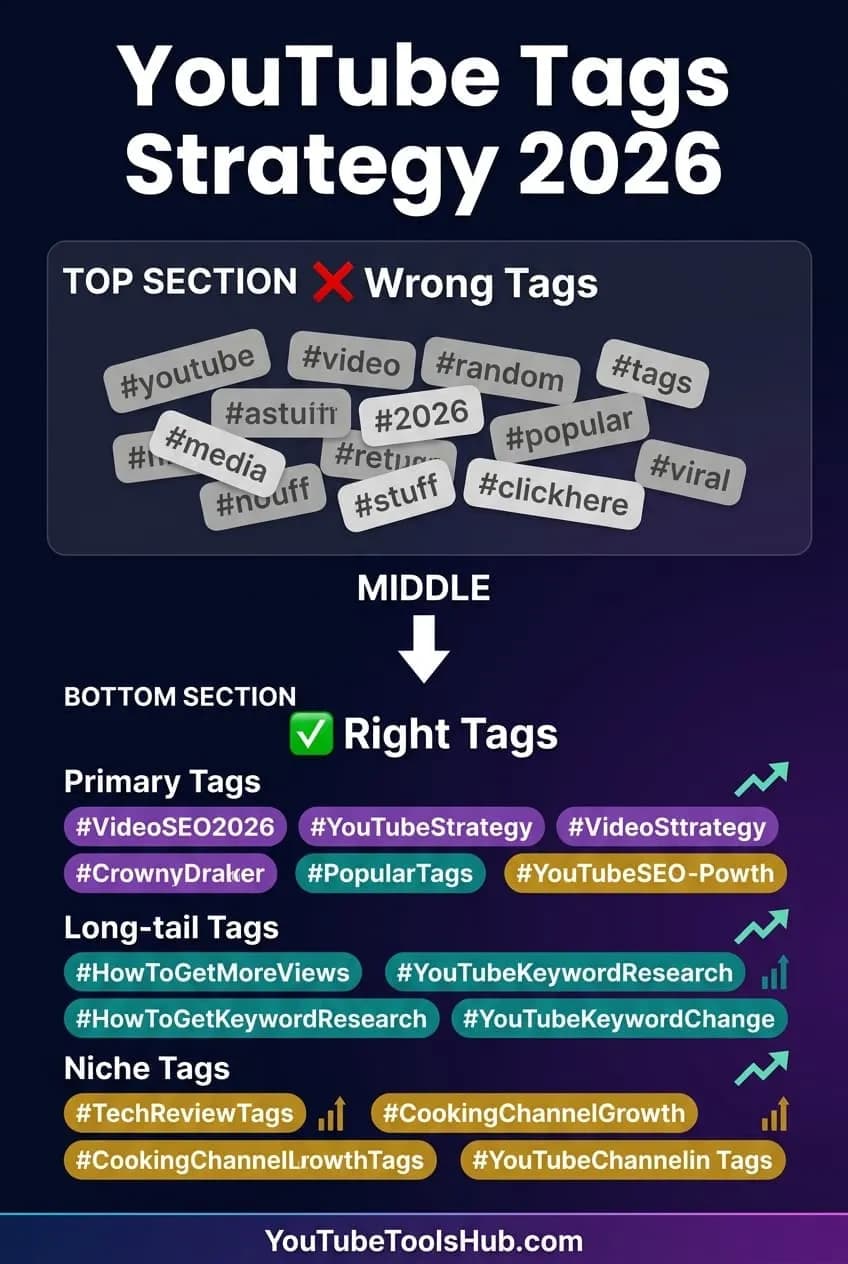
YouTube tag strategy comparison showing wrong vs right tagging approaches with color-coded keyword categories
---
The anatomy of a perfect YouTube tag set
Most creators who struggle with tags make one of two mistakes: they either add 5 generic tags and call it done, or they dump 30+ random keywords hoping something sticks.
Here's the structured approach that actually works in 2026:
Layer 1: Primary keyword tag (1–2 tags)
Your exact main keyword. If your video is titled "How to Make Money on YouTube," your primary tag should be: `how to make money on youtube`
This is your anchor — everything else supports it.
Layer 2: Variation tags (3–4 tags)
Slight rephrasing of your core topic:
- `make money youtube 2026`
- `youtube income for beginners`
- `earn from youtube`
These capture searchers who phrase things slightly differently.
Layer 3: Long-tail question tags (2–3 tags)
Full questions your target viewer might search:
- `how much does youtube pay per view`
- `can you make money on youtube without subscribers`
These convert incredibly well because they match high-intent, specific search queries.
Layer 4: Niche/category tags (2–3 tags)
Broad category labels that help with suggested video placement:
- `youtube monetization`
- `creator economy 2026`
- `passive income online`
Layer 5: Brand tag (1 tag)
Your channel name. This helps YouTube associate your video with your channel's topical authority.
Want this built automatically for any topic? Use the YouTube Tag Generator — it applies this exact framework to any keyword you enter.
---
Step-by-step: How to use a YouTube tag generator effectively
Using a tag generator isn't just "type keyword → copy output → done." Here's how top creators use these tools to get maximum impact:
Step 1: Start with your video's exact title keyword
Don't enter a broad topic like "fitness." Enter the specific angle: "home chest workout no equipment." The more specific your input, the more targeted and useful the output tags will be.
Step 2: Generate and review the output
A good tag generator (like ours at YouTube Tools Hub) will give you a categorized list of tags — primary, secondary, long-tail. Review each tag and remove anything clearly irrelevant to your video.
Step 3: Check character count
YouTube's 500-character tag limit is stricter than it sounds when you add spaces. Aim for 400–480 characters so you have breathing room. Our tool automatically shows you the character count as you build your tag list.
Step 4: Paste into YouTube Studio correctly
In YouTube Studio, go to your video → Details → click More options→ scroll to theTagsfield. Paste your comma-separated tags there. Double-check that the field accepts the full list without truncating.
Step 5: Monitor and iterate
After 2–4 weeks, check YouTube Studio'sTraffic source: YouTube search report. If you're ranking for unexpected keywords, add more related tags. If a tag is driving zero impressions, swap it for a more targeted option.
Pro Tip
Pair your tag research with the YouTube SEO Checklist to ensure your title, description, thumbnail, and chapters are all aligned with the same core keyword — tag coherence is much stronger when every metadata element points in the same direction.
---
YouTube tags vs. hashtags: the difference matters
This trips up a lot of new creators, so let's settle it clearly:
| Feature | Tags (backend) | Hashtags (frontend) |
|---|---|---|
| Where added | YouTube Studio → Tags field | Title or description (use #) |
| Visible to viewers? | No | Yes (clickable) |
| Main purpose | Algorithm categorization | Discovery via hashtag pages |
| Character limit | 500 characters total | 3 hashtags in title show above title |
| SEO weight | Secondary signal | Moderate for hashtag searches |
Best practice in 2026:Use 3 hashtags in your description (or 1 in the title for strong topics), and use 10–15 tags in the Tags field. They're not interchangeable — use both properly.
Need help with hashtags specifically? The YouTube Hashtag Generator is free and works alongside the tag tool. For the public # list (not the Studio tags field), use the hashtag generator guide.
---
Common YouTube tag mistakes (and how to fix them)
Mistake 1: Using only broad, generic tags
❌ `youtube`, `video`, `how to`, `tips`
✅ `youtube channel growth tips 2026`, `how to grow youtube fast`
Generic tags put you in massive competition pools. Specific tags put you in smaller, winnable pools.
Mistake 2: Keyword stuffing the same phrase
❌ `youtube seo`, `youtube SEO`, `YouTube SEO tips`, `youtubeseo`, `youtube seo 2026`
✅ Keep 1–2 variations of each phrase, not 6
Repeating the same keyword in slightly different capitalization or spacing doesn't boost ranking — it wastes your 500 characters.
Mistake 3: Copying competitor tags blindly
Some creators use tag extractor tools to copy a competitor's entire tag list. The problem? You're now fighting that competitor on their strongest tags rather than finding angles where you can win. Study their tags, then differentiate.
Mistake 4: Ignoring tags completely
"Tags don't matter anymore" is one of the most repeated (and wrong) pieces of YouTube advice. They matter less than they did in 2014, but they still provide meaningful categorization and suggested video signals. Skipping them is leaving easy SEO on the table.
Mistake 5: Using the same tags on every video
If every video has identical tags, YouTube sees your channel as undifferentiated. Customize at least 70% of your tags per video to signal topical specificity.
Important
Always make sure your tags aretruthful and relevant to your video's actual content. YouTube's Community Guidelines explicitly prohibit "misleading metadata" — tags that are unrelated to the video content can result in demotion or removal from search. See the full YouTube SEO checklist for compliance best practices.
---
The "Tag Cluster" method: advanced strategy for 2026
Here's a technique that most free guides won't tell you: building tag clusters across multiple videos.
Instead of treating each video's tags as isolated, create a tag system where related videos share a set of core "cluster tags" while each video also has its own unique specific tags.
For example, if you run a personal finance channel:
Cluster tags (shared across all personal finance videos):
- `personal finance tips`
- `money management 2026`
- `financial freedom`
Video-specific tags (unique per video):
- Video about budgeting: `50 30 20 budget rule`, `how to make a budget`, `monthly budget template`
- Video about investing: `index funds for beginners`, `how to start investing`, `vanguard vs fidelity 2026`
This creates a web of tag relationships that reinforces your channel's topical authority over time. YouTube starts to understand: "This channel is a reliable source for personal finance content."
Want to research the right cluster tags for your niche? Use the YouTube Keyword Research Tool alongside the tag generator.
---
Free vs. paid YouTube tag tools: what you actually need
There are dozens of tag tools on the market. Here's an honest comparison:
| Tool | Cost | Best for |
|---|---|---|
| YouTube Tools Hub Tag Generator | 100% Free | Creators at any level needing fast, AI-generated tags |
| TubeBuddy Tag Explorer | Freemium ($9–$49/mo) | Advanced tag ranking data + A/B testing |
| VidIQ Tag Suggestions | Freemium ($10–$49/mo) | Competitor tag analysis + trend alerts |
| Keyword Tool (keywordtool.io) | Free/Paid | YouTube autocomplete mining |
| Ahrefs | $99+/mo | Deep search volume + competition data |
For most creators — especially those just starting out or running on a budget — the free YouTube Tag Generator at YouTube Tools Hub covers everything you need. It applies AI to generate a balanced, 500-character-optimized tag set in seconds.
If you're specifically comparing the leading paid tools, read the TubeBuddy vs VidIQ 2026 breakdown to understand where paid tools genuinely add value.
---
How to find the best tags for your niche in 2026
Beyond using a generator, here are three research methods that professional creators combine:
Method 1: YouTube autocomplete mining
Type your main keyword into YouTube's search bar and note the autocomplete suggestions. Every suggestion is a real query that real people are searching. These are gold-standard tags.
Method 2: Analyze top-performing videos in your niche
Use a tag extractor tool or browser extension to see what tags successful videos in your niche are using. Identify patterns — what tags do the top 5 videos share? Those are your core cluster tags.
Method 3: Use your own video's traffic report
After publishing, go to YouTube Studio → Analytics → Traffic source → YouTube search. You'll see which actual search queries drove people to your video. Use those terms as tags on future related videos — they're proven traffic-drivers in your niche.
Combine all three approaches with the AI suggestions from the tag generator and you'll build a data-driven tag strategy rather than guessing.
---
Quick-start: your first optimized tag set in 3 minutes
Here's a 3-minute workflow you can follow right now:
1.Write your video title(before recording helps, but works after too)
2.Go to YouTube Tag Generator→ enter the core topic
3.Copy the generated tag list→ paste into YouTube Studio's Tags field
4.Add 3 hashtagsto your description using the Hashtag Generator
5.Check your title + description→ make sure your primary keyword appears naturally in the first sentence of your description
6.Write chapters→ use the Timestamp Generator to create chapters that reinforce your keyword structure
That's it. Most creators who follow this workflow report noticeably better impressions within 2–4 weeks.
---
Tag optimization as part of a complete YouTube SEO system
Tags work best when they're part of a coherent SEO system — not just an afterthought. Here's how tags fit into the bigger picture:
-Keyword research→ identifies what your audience is searching for (tags stem from this)
-Title optimization→ your primary keyword in a compelling, click-worthy phrase
-Description writing→ natural keyword integration in the first 150 characters
-Tags→ reinforce the title/description keyword theme with variations and long-tails
-Chapters/timestamps→ structured content that matches user search intent
-Thumbnail→ drives CTR, which boosts ranking more than any tag ever could
-Watch time → the ultimate ranking signal; tags can get impressions, but content keeps viewers
For the complete system, bookmark the YouTube SEO Checklist 2026. Every item on that checklist works together — tags are just one piece of a well-tuned machine.
If you want to understand how YouTube's algorithm decides what to rank, the YouTube Algorithm Guide 2026 explains the full ranking factors in plain language.
---
Backlinks and off-platform signals for YouTube SEO
While tags help on YouTube itself, off-platform signals also influence how quickly YouTube trusts your content:
What actually helps:
- Embedding your video in blog posts (which earn backlinks to your YouTube URL)
- Getting your video linked from high-authority sites in your niche
- Social shares driving traffic spikes (signals popularity to YouTube)
- Email newsletter embeds (sends warm, engaged traffic)
What to do:
- Write a companion blog post for each major video (matching the same keyword)
- Share on relevant Reddit communities, forums, and Facebook groups
- Ask creators in adjacent niches to mention your video (collaborative growth)
- List your channel in niche directories and creator databases
The combination of strong on-page YouTube metadata (tags, titles, descriptions) + off-platform authority signals is what separates channels that plateau at 1k subscribers from those that compound to 100k+.
Note
YouTube Tools Hub is itself an external authority resource for creators. When you link back to informative guides like this one from your own blog or website, you're building the kind of ecosystem signals that help both your site and your channel's credibility in YouTube's eyes.
---
Bottom line
YouTube tags in 2026 aren't magic ranking bullets — but they're also not pointless metadata you should skip. They're a 3-minute investment that helps YouTube categorize your content correctly, surface it in the right suggested feeds, and capture search traffic from variations and misspellings.
The simplest move you can make today: open the free YouTube Tag Generator, enter your next video's topic, and paste the generated tags into YouTube Studio before you hit publish.
Pair that habit with an optimized title, a keyword-rich description, and consistent content in a focused niche — and you're building the kind of channel that YouTube's algorithm genuinely wants to recommend.
Ready to generate tags for your next video?→ Try the YouTube Tag Generator — it's free, instant, and requires no sign-up
Topics
❓Frequently Asked Questions
What is a YouTube tag generator?
A YouTube tag generator is a free or paid tool that automatically creates a list of relevant, SEO-optimized tags for your YouTube videos based on your topic, title, or seed keyword. Good tag generators analyze search intent, competitor tags, and trending terms to give you a mix of primary keywords, long-tail phrases, and niche-specific tags that help YouTube's algorithm understand and rank your content.
Do YouTube tags still matter in 2026?
Yes, but their role has evolved. Tags are now a secondary signal — YouTube's algorithm primarily reads titles, descriptions, thumbnails, and viewer behavior. However, tags still help YouTube categorize your video correctly, improve 'suggested video' placements next to similar content, and capture traffic from misspelled searches. Using 8–15 well-chosen tags remains a best practice in 2026.
How many tags should I put on a YouTube video?
YouTube allows up to 500 characters for tags. Most SEO experts recommend using 10–15 targeted tags that cover: 1–2 exact-match primary keywords, 3–5 related secondary keywords, 2–4 long-tail question phrases, and 1–2 brand or channel-specific tags. Avoid stuffing 40+ generic tags — it signals spam and dilutes your relevance signal.
Can I use a competitor's channel name as a YouTube tag?
Technically you can add competitor names as tags, but YouTube explicitly discourages using 'unrelated tags' or misleading metadata. Doing so can result in your video being penalized in rankings or removed from search results. Focus on topic-relevant tags instead — that's what the algorithm actually rewards.
What is the difference between YouTube tags and hashtags?
YouTube tags (added in the 'Tags' field in YouTube Studio) are backend metadata visible only to the algorithm — not viewers. YouTube hashtags (added with the # symbol in the title or description) are clickable, front-facing labels that appear on the video page and link to a hashtag search results page. Both serve different purposes: tags aid categorization, hashtags aid discovery and surfacing in trending hashtag feeds.
Is there a completely free YouTube tag generator?
Yes. YouTube Tools Hub offers a 100% free AI-powered YouTube Tag Generator that requires no sign-up, no credit card, and no usage limits. You enter your video topic or keyword and get a ready-to-paste list of tags optimized for search, suggestions, and 500-character limits — instantly.
Should I use the same tags on every video?
No. Using identical tags across all videos tells YouTube your channel is generic rather than authoritative in a specific niche. Customize tags for each video topic. You can keep 2–3 brand-specific tags consistent (your channel name, niche category) while customizing the rest per video to match the specific search queries that video targets.
Free tools for this topic
Apply what you just read with free creator tools — no signup required.