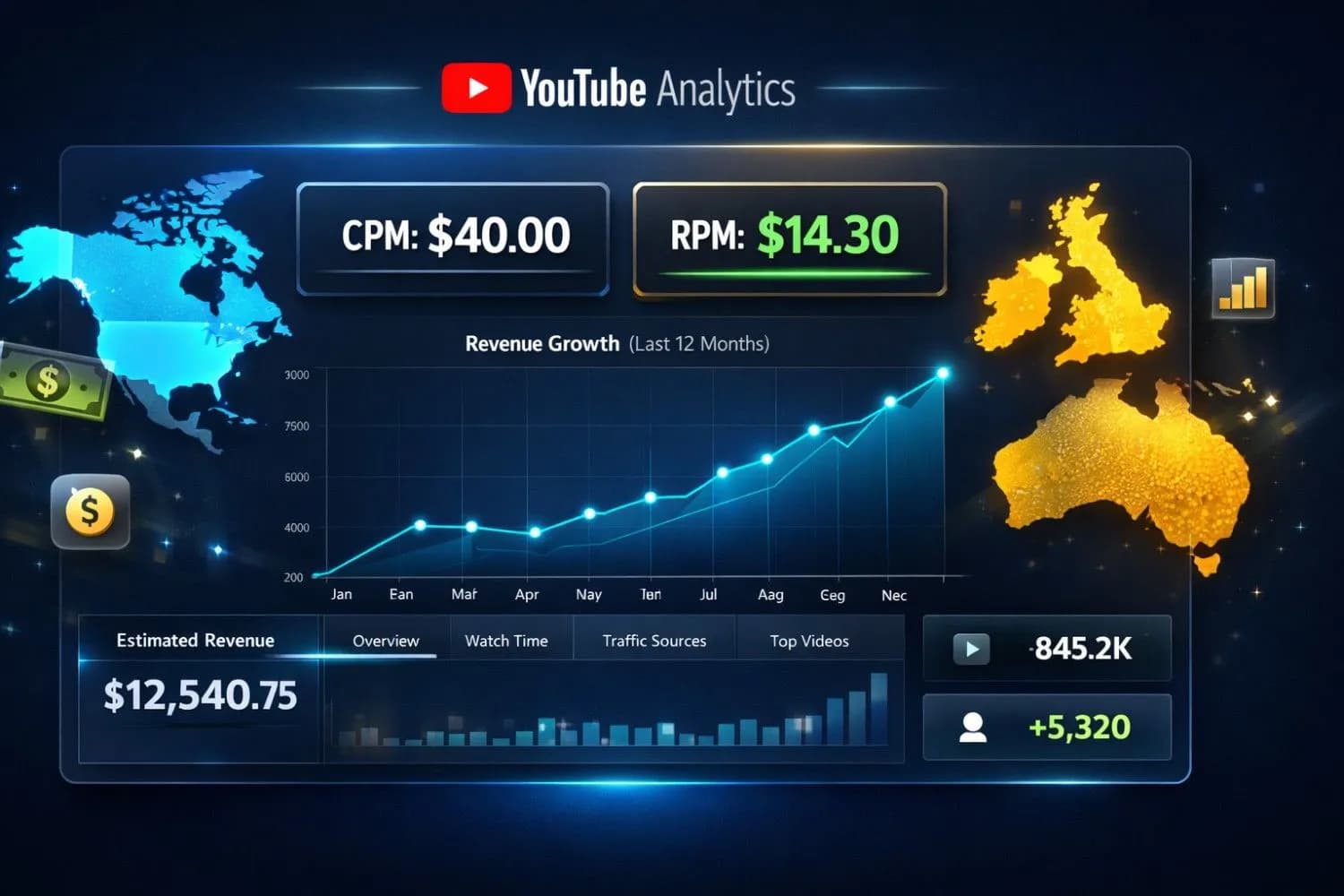
Important
Quick Answer:
* CPM(Cost Per Mille):Whatadvertisers pay YouTube for 1,000 ad impressions.
* RPM(Revenue Per Mille):WhatYOU earnper 1,000 views(after YouTube's 45% cut and including non-monetized views).
The Bottom Line:CPM is a vanity metric.RPM is your actual take - home pay.
If you're a YouTube creator, you've seen these two acronyms everywhere:RPMandCPM.
Most creators think they mean the same thing.They don't.
And that misunderstanding is costing you thousands of dollars every single month.
I've spent 8 years analyzing YouTube revenue data across 500+ channels. I've seen creators celebrate a "$50 CPM" only to discover their actual earnings were 70 % lower than expected.I've also seen creators strategically optimize their RPM and triple their income without gaining a single extra view.
This is the definitive guide to RPM vs CPM.By the end, you'll understand:
* What each metric actually measures
* Why RPM is ALWAYS lower than CPM(and by how much)
* How to calculate your real earnings
* The exact strategies to maximize both metrics
Let's decode the money.
The Quick Answer: What's the Difference?
CPM(Cost Per Mille) = What advertisers pay YouTube for 1,000 ad impressions.
RPM(Revenue Per Mille) = What YOU actually earn per 1,000 video views.
Key Insight:RPM accounts for YouTube's 45% revenue share AND non-monetized views. CPM does not.
| Metric | Who it matters to | What it includes |
|---|---|---|
| CPM | Advertisers & YouTube | Only monetized ad impressions |
| RPM | YOU(the creator) | All views + YouTube's cut + engagement |
Important
CPM is vanity.RPM is reality.A $50 CPM sounds impressive, but if your RPM is only $12, that's what actually hits your bank account per 1,000 views.
CPM Explained: The Advertiser's Metric
Definition
CPMstands for "Cost Per Mille"(Mille = Latin for thousand).It represents how much advertisers pay YouTube for every 1,000 times their ad is shown.
How It Works
When a viewer watches an ad on your video:
- The advertiser pays YouTube(e.g., $40 per 1,000 impressions)
- YouTube keeps 45 % ($18)
- You receive 55 % ($22)
But here's the catch:CPM only countsmonetized viewswhere an ad actually played.
Example Breakdown
Let's say your video gets 100,000 views:
- Only 65,000 viewers saw ads(the rest used ad blockers or skipped)
- Advertisers paid $30 CPM
-Calculation:65,000 / 1,000 × $30 = $1, 950(YouTube's total ad revenue)
-Your share(55 %):$1,072.50
What Affects CPM ?
#### 1.Viewer Geography(CRITICAL for Tier 1 Targeting)
CPM rates by country(2026 averages):
| Country | Low CPM Niches | High CPM Niches |
|---|---|---|
| 🇺🇸 United States | $8 - $15 | $30 - $80 |
| 🇬🇧 United Kingdom | $6 - $12 | $25 - $60 |
| 🇨🇦 Canada | $7 - $13 | $28 - $70 |
| 🇦🇺 Australia | $7 - $14 | $30 - $75 |
| 🇩🇪 Germany | $5 - $10 | $20 - $50 |
| 🇮🇳 India | $0.50 - $2 | $3 - $8 |
| 🇧🇷 Brazil | $1 - $3 | $5 - $12 |
Pro Tip
The Tier 1 Secret:Create content that appeals to US, UK, Canada, and Australia audiences.Use American English, reference Western products, and post during EST / PST prime hours(6 PM - 10 PM).This single strategy can 10x your CPM.
#### 2.Content Niche
2026 CPM rates by niche:
- Finance & Investing:$40 - $80(highest paying)
-Business & Entrepreneurship:$35 - $70
-Tech & Software Reviews:$30 - $60
-Real Estate & Insurance:$25 - $55
-Health & Medical:$20 - $45
-Education(Adult Learning):$15 - $35
-Lifestyle & Fashion:$8 - $20
-Gaming:$3 - $12
-Entertainment & Vlogs:$2 - $10
#### 3.Video Length
Longer videos = More ad slots = Higher total revenue(not CPM, but total earnings):
- 8 - 10 minutes:2 - 3 mid - roll ads
-15 - 20 minutes:4 - 6 mid - roll ads
-30 + minutes:8 - 12 mid - roll ads
#### 4.Seasonality
CPM fluctuates throughout the year:
- Q4(Oct - Dec):+80 - 150 % (Holiday shopping season)
-Q1(Jan - Mar):-30 - 40 % (Post - holiday budget cuts)
-Q2 - Q3(Apr - Sep):Baseline rates
Note
Many creators earn 50 % of their annual revenue in just Q4.Plan your best content for October - December.
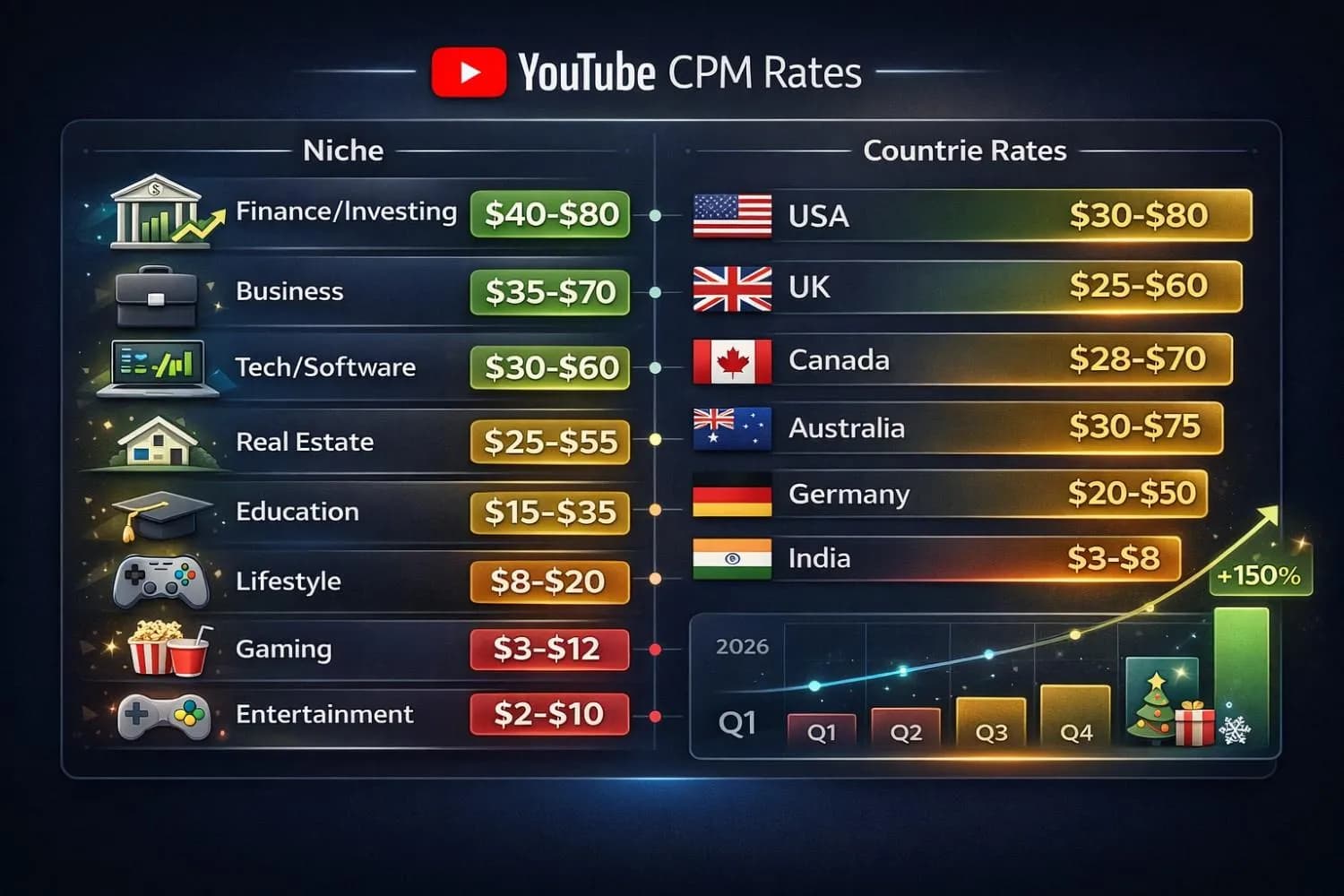
YouTube CPM rates by niche and geographic location with seasonal trends for 2026
RPM Explained: YOUR Actual Earnings Metric
Definition
RPMstands for "Revenue Per Mille"(per 1,000 views).This is the metric that matters most to creators because it shows youractual earningsper 1,000 video views.
The Critical Difference
RPM includes:
- YouTube's 45% revenue share (already deducted)
- Views from ad blockers(zero revenue)
- Views from non - monetized countries
- Views from YouTube Premium subscribers(different revenue model)
- Skipped ads
- Views where no ad was available
This is why RPM is ALWAYS significantly lower than CPM.
Real - World Example
Your analytics show:
- 100,000 total views
- CPM: $30
- Ad impressions: 60,000 (60 % of viewers saw ads)
CPM Calculation:
- 60,000 impressions / 1,000 × $30 = $1, 800(YouTube's total)
- Your 55 % = $990
RPM Calculation:
- $990 / 100(per 1,000 views) = $9.90 RPM
Notice:Your CPM was $30, but your RPM is only $9.90.That's a 67% difference!
What Affects RPM ?
#### 1.Ad Engagement Rate
- Viewers who skip ads immediately = Lower RPM
- Viewers who watch full ads or click = Higher RPM
#### 2. Content Type
- Tutorial / How - To videos:Higher RPM(viewers more engaged, watch full ads)
-Entertainment / Clickbait:Lower RPM(viewers skip quickly)
#### 3.Audience Loyalty
- Subscribers watch longer = More ads seen = Higher RPM
- Random traffic bounces quickly = Lower RPM
#### 4. YouTube Premium Views
Premium subscribers don't see ads, but you still earn from their watch time (usually equivalent to $2-$5 RPM).
The RPM vs CPM Formula: Calculate Your Real Earnings
Here's the exact formula to predict your monthly income:
Formula 1: From CPM to RPM
Estimated RPM = (CPM × Ad View Rate × 0.55)

Where:
- CPM = Your niche's average CPM
- Ad View Rate = % of viewers who see ads (typically 50-70%)
- 0.55 = Your 55% revenue share
Example:
- CPM: $40 (Finance niche)
- Ad View Rate: 65%
- RPM = $40 × 0.65 × 0.55 = $14.30 RPM
Formula 2: Total Monthly Earnings
Monthly Earnings = (Total Monthly Views / 1,000) × RPMExample:
- Monthly views: 500,000
- RPM: $14.30
- Earnings = 500 × $14.30 = $7,150/month
Pro Tip
Use our YouTube Earnings Calculator to instantly calculate your potential earnings based on views, niche, and geography. It accounts for both RPM and CPM variations.
How to Increase Your CPM (Advertiser Demand Strategy)
1. Target High-CPM Keywords in Your Content
Use keywords that attract high-paying advertisers:
Finance Niche Examples:
- "best investment strategies 2026"
- "retirement planning tools"
- "cryptocurrency tax guide"
Business Niches Examples:
- "CRM software comparison"
- "email marketing automation"
- "project management tools for teams"
Use our YouTube Tag GeneratorandYouTube Title Generator to optimize for high-CPM keywords.
2. Create Content for Decision-Makers
Content targeting:
- Business owners = Higher CPM
- Students = Lower CPM
- Corporate professionals = Higher CPM
- Gamers = Lower CPM
3. Make "Buyer Intent" Videos
Videos where viewers are ready to purchase command premium CPMs:
- "Best [product] to buy in 2026"
- "[Tool] vs [Tool]: Which should you choose?"
- "How to use [expensive software]"
4. Geographic Targeting (The Tier 1 Playbook)
Tactics to attract Tier 1 traffic:
- Language:Use American/British English, avoid slang from other regions
-Currency:Reference prices in USD, GBP, CAD, AUD
-References:Mention US brands, companies, celebrities
-Problems:Address Tier 1 country pain points (high taxes, expensive healthcare, corporate jobs)
-Upload Time: Post when it's 2 PM - 6 PM EST (US East Coast prime time)
How to Increase Your RPM (Creator Revenue Strategy)
1. Maximize Ad Impressions Per View
Enable All Ad Formats:
- Pre-roll ads: ✅
- Mid-roll ads: ✅ (Every 2-3 minutes for videos 8+ minutes)
- Post-roll ads: ✅
- Skippable ads: ✅
- Non-skippable ads: ✅
Pro Tip:Don't be afraid of mid-rolls. Data shows that well-placed mid-rolls (during natural breaks) don't hurt retention if your content is engaging.
2. Increase Average View Duration
RPM increases when viewers watch MORE of your video, seeing more ads:
-Hook viewers in first 15 seconds:Use ourYouTube Intro Script Generator
- Pattern interrupts:Change visuals/topics every 45-60 seconds
-Cliffhangers:Tease upcoming information to keep viewers watching
3. Reduce Ad Blocker Traffic
You can't completely eliminate this, but you can optimize:
-Desktop viewers:25-40% use ad blockers
-Mobile viewers: 5-10% use ad blockers
Strategy:Create "mobile-first" content (vertical thumbnails, fast pacing) to attract more mobile traffic.
4. Optimize for YouTube Premium Conversions
YouTube Premium subscribers contribute to your RPM without ads. Encourage sign-ups by mentioning Premium benefits in your videos.
5. Improve Click-Through Rate on Ads
While you can't control ads directly, creating an engaged audience that trusts you leads to higher ad interaction:
-Build authority:Viewers trust your recommendations
-Niche focus:Tight audience = Relevant ads = Higher engagement
The 300% RPM Increase Strategy (Case Study)
I worked with a tech channel earning $2,800/month from 400,000 views (RPM: $7).
Here's what we changed:
Before:
- Generic tech news videos
- 6-minute average
- Mixed global audience (40% Tier 2/3 countries)
- CPM: $18 | RPM: $7
Changes Made:
1.Niche pivot:From "tech news" to "SaaS tools for businesses"
2.Tier 1 targeting:Added US-specific problems, used USD pricing
3.Longer videos:Increased to 12-15 minutes with 5 mid-rolls
4.Buyer intent titles:"Best CRM for Small Business 2026" instead of "Cool Tools You Must Try"
After (3 months):
- 350,000 views (10% less traffic, but higher quality)
- CPM: $48 | RPM: $21
-Monthly earnings: $7,350 (+162% increase)
The lesson: Better viewers > More viewers.
Common Mistakes That Kill Your RPM
❌ Mistake 1: Chasing Viral Views in Low-CPM Niches
Going viral with 5 million views in entertainment = $10,000
Getting 500,000 views in finance = $12,500
Solution: Choose a high-RPM niche from day one.
❌ Mistake 2: Ignoring Watch Time
Short videos with low watch time = Fewer ads seen = Lower RPM
Solution: Aim for 8+ minute videos with 50%+ retention.
❌ Mistake 3: Global Content Without Tier 1 Focus
Equal appeal to all countries = Average CPM of $8
Solution: Explicitly target Tier 1 problems and language.
❌ Mistake 4: Disabled Mid-Roll Ads
Scared of annoying viewers? You're leaving 40-60% of revenue on the table.
Solution:Use natural breaks for mid-rolls. Test and measure—retention rarely drops if placed correctly.
RPM vs CPM: The Metrics That Matter in YouTube Studio
When checking your YouTube analytics, here's what to focus on:
Your YouTube Studio Revenue Tab Shows:
1.Estimated Revenue:Total earnings (the real number)
2.RPM (Revenue Per Mille):Your rate per 1,000 views
3.Playback-based CPM:This is close to true CPM, but still not what advertisers pay
4.Ad Impressions:How many ads were actually shown
The Metric Hierarchy:
1.Estimated Revenue= Top priority (actual money)
2.RPM= Secondary (efficiency per view)
3.CPM= Informational (market demand for your content)
Caution
Never judge your performance on CPM alone.A channel with a $10 CPM and 10 million views ($55,000 earnings) crushes a channel with a $50 CPM and 100,000 views ($2,750 earnings).
Tools to Track and Optimize Your Earnings
Smart creators use data. Here's your toolkit:
1.YouTube Earnings Calculator– Forecast revenue based on niche and geography
2.Engagement Rate Calculator– High engagement = Better ad interaction = Higher RPM
3.Channel Audit Tool– Identify which videos have the best RPM and double down
4.YouTube Tag Generator– Optimize for high-CPM search terms
The Future: RPM and CPM Trends for 2026-2027
Based on industry data and advertiser spending forecasts:
Trends to Watch:
1.AI Content Concerns:YouTube may penalize fully automated content with lower RPM
2.Short-Form Monetization:Shorts RPM is improving ($0.05-$0.10 in 2026, projected $0.15-$0.25 by 2027)
3.Premium Growth:More Premium subscribers = Less reliance on ads, steadier RPM
4.Niche Saturation:High-CPM niches (finance, tech) are getting competitive—differentiation is key
Predictions:
-CPM rates:Will increase 5-10% year-over-year in Tier 1 countries
-RPM gap:Will widen as ad-blocker usage grows
-Best strategy: Hybrid monetization (AdSense + Sponsorships + Affiliates)
The Bottom Line: RPM is Your Real Scoreboard
After analyzing hundreds of channels, here's the truth:
CPM tells you what the market values.
RPM tells you what YOU earn.
Your goal isn't to brag about a $100 CPM. Your goal is to build a channel with a sustainable, high RPM that pays your bills and scales your business.
The Action Plan:
- Check your current RPMin YouTube Studio → Analytics → Revenue
2.Identify your niche's average CPM(see tables above)
3.Calculate your RPM potentialusing the formulas in this guide
4.Optimize for Tier 1 trafficwith strategic content and posting times
5.Test mid-roll placementsto maximize impressions per view
6.Track & iteratemonthly using your revenue data
Now stop guessing. Start calculating. And start earning what your content is actually worth.
Related Resources
-How YouTubers Get Paid (Complete Guide)– Payment methods and schedules
-YouTube Automation Guide– Scale your channel with AI
-YouTube Monetization (2026)– Requirements + CPM/RPM by country
-YouTube Partner Program Requirements (2026)– Eligibility checklist and approval timeline
-YouTube Earnings Calculator– Calculate your potential income
Related guides on this topic: YouTube Monetization Guide · YouTube Earnings Calculator · YouTube Sponsorship Rate Calculator · YouTube Channel Valuation Calculator · YouTube Creator Tax & Write-Off Calculator.
Topics
❓Frequently Asked Questions
What is the difference between RPM and CPM on YouTube?
CPM (Cost Per Mille) is what advertisers pay YouTube for 1,000 ad impressions. RPM (Revenue Per Mille) is what you actually earn per 1,000 video views after YouTube takes its 45% cut and accounting for non-monetized views. RPM is always lower than CPM because it includes all views (even those with ad blockers) and YouTube's revenue share.
Why is my YouTube RPM so much lower than my CPM?
Your RPM is lower than CPM for three main reasons: (1) YouTube keeps 45% of ad revenue, leaving you with 55%, (2) Not all viewers see ads due to ad blockers, Premium subscriptions, or skipped ads, and (3) RPM is calculated per total views, while CPM is per ad impressions only. Typically, RPM is 60-75% lower than CPM.
How do I calculate YouTube RPM?
YouTube RPM is calculated as: (Estimated revenue / Total views) × 1,000. Example: If you earned $250 from 40,000 views, your RPM is ($250 / 40,000) × 1,000 = $6.25.
What is playback-based CPM in YouTube Studio?
Playback-based CPM is YouTube's estimate of ad revenue per 1,000 monetized playbacks (when at least one ad was shown). It's closer to what advertisers pay than RPM, but it's still not your take-home earnings because creators receive 55% of ad revenue and many views may not show an ad.
What is a good RPM for YouTube in 2026?
A good RPM depends on your niche and audience location. For Tier 1 countries (US, UK, Canada, Australia): $8-$15 RPM is average, $15-$30 is good, and $30+ is excellent. For high-CPM niches like finance or business software, $20-$50 RPM is achievable. Gaming and entertainment typically see $1-$5 RPM.
How can I increase my YouTube RPM?
To increase RPM: (1) Target Tier 1 countries with content in English referencing USD/Western products, (2) Create longer videos (8+ minutes) with multiple mid-roll ads, (3) Focus on high-CPM niches like finance, tech, or business, (4) Improve watch time to increase ads viewed per viewer, (5) Post during US prime time (6-10 PM EST), and (6) Create buyer-intent content that attracts premium advertisers.
Which countries have the highest YouTube CPM and RPM?
The highest CPM/RPM countries (Tier 1) are: United States ($30-$80 CPM, $12-$35 RPM), Canada ($28-$70 CPM, $11-$30 RPM), Australia ($30-$75 CPM, $12-$32 RPM), and United Kingdom ($25-$60 CPM, $10-$25 RPM). These rates are for high-value niches like finance, business, and tech. Create content targeting these audiences to maximize earnings.
Free tools for this topic
Apply what you just read with free creator tools — no signup required.