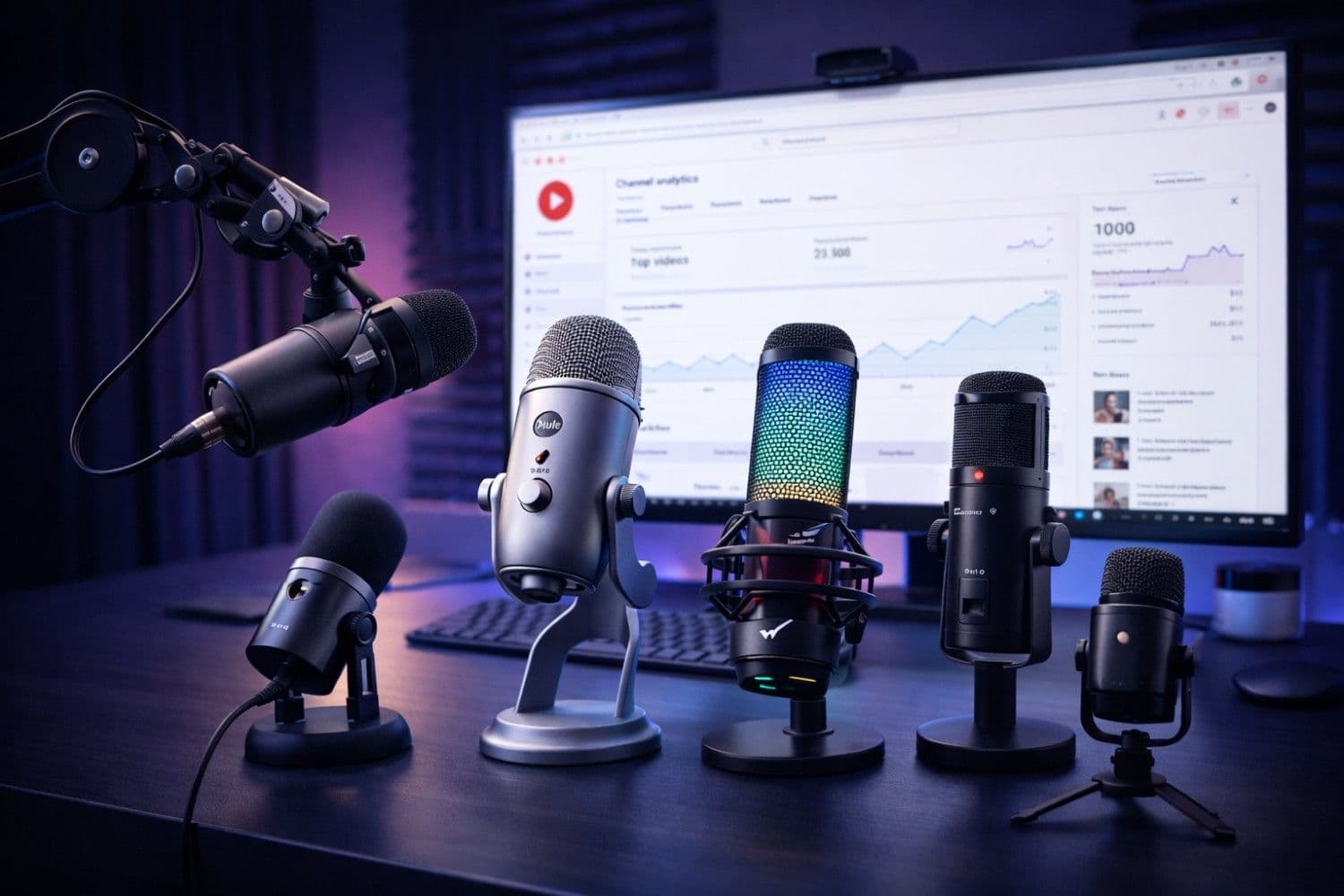
Your audio quality is the single most important production element on YouTube and in podcasting. Viewers will tolerate mediocre video, but the moment they hear hissing, room echo, or muffled speech, they click away. According to a 2025 study by Wistia, poor audio quality reduces average viewer retention by up to 60%.
The good news? In 2026, USB microphones have reached a point where a $50 mic can deliver audio quality that would have cost $500 a decade ago. USB mics plug directly into your computer—no audio interface, no phantom power supply, no XLR cables. Just plug, select the device in your recording software, and start creating.
This comprehensive guide reviews the best USB microphones for YouTube and podcasting in 2026, covering every budget tier and use case. Whether you're recording your first video or upgrading a professional home studio, we'll help you find the perfect mic.
Pro Tip
Quick Answer — Best USB Microphone for YouTube in 2026:
- Best Overall: Rode NT-USB+ ($169) — Studio-quality condenser with built-in DSP
- Best Budget: Fifine K669B ($29) — Unbeatable value for beginners
- Best for Podcasting: Shure MV7+ ($279) — Hybrid USB/XLR with voice isolation
- Best for Streaming: HyperX QuadCast S ($139) — RGB lighting with excellent pickup
- Best Portable: Samson Q2U ($69) — USB + XLR dual connectivity
Why Audio Quality Matters More Than Ever for YouTube
Before diving into microphone reviews, let's understand why audio is your highest-ROI investment as a creator.
The Algorithm Rewards Watch Time — Audio Drives Watch Time
YouTube's recommendation algorithm in 2026 is fundamentally powered by Average View Duration (AVD). Videos with higher AVD get pushed to more viewers through Browse, Suggested, and the Shorts shelf.
Here's the critical insight: audio quality directly impacts AVD. A viewer watching a tutorial with crystal-clear narration will stay 2-3x longer than one struggling to hear through background noise. This means better audio → higher AVD → more algorithmic promotion → exponentially more views.
If you're serious about getting more views on YouTube, upgrading your microphone is the single fastest path to improving your metrics.
The Podcasting Boom Demands Professional Audio
Podcasting continues its explosive growth trajectory in 2026, with over 500 million active podcast listeners globally. Apple Podcasts, Spotify, and YouTube Podcasts all use audio quality as a ranking signal. A USB microphone that delivers broadcast-quality audio is no longer optional—it's table stakes.
For creators converting podcasts into YouTube content using tools like AI video editors, pristine source audio ensures the final product sounds professional across every distribution platform.
How We Tested and Ranked These Microphones
Every microphone in this guide was evaluated across five critical dimensions:
| Criteria | Weight | What We Measured |
|---|---|---|
| Audio Quality | 35% | Frequency response, clarity, warmth, noise floor |
| Background Noise Rejection | 25% | Performance in untreated rooms (real creator conditions) |
| Build Quality & Design | 15% | Materials, durability, desk footprint, aesthetics |
| Software & Features | 15% | Companion apps, DSP, gain control, monitoring |
| Value for Money | 10% | Price-to-performance ratio at each tier |
We tested each microphone in a real home office environment—not an acoustically treated studio—because that's where 90% of YouTube creators actually record.
The 8 Best USB Microphones for YouTube & Podcasting (2026)
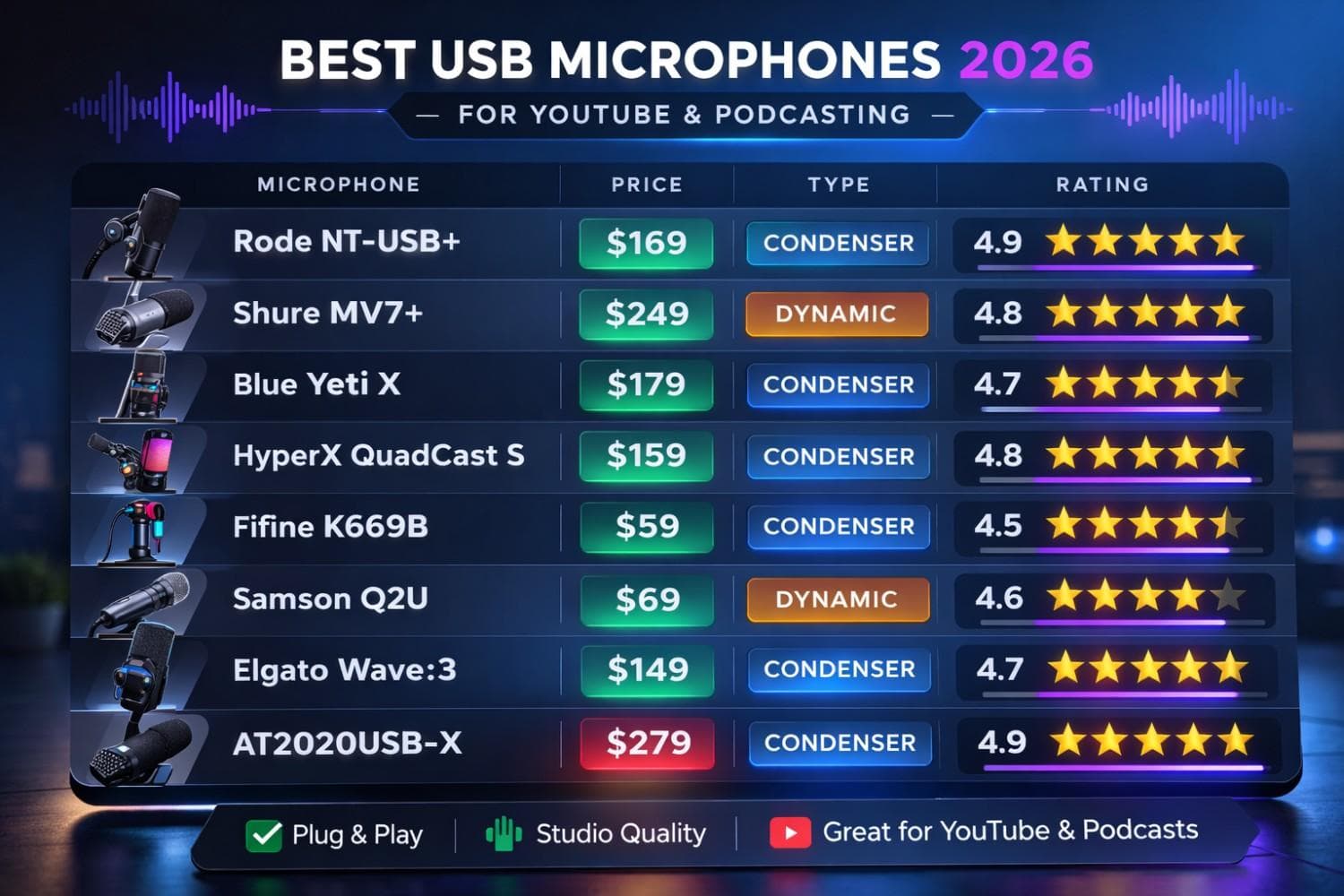
Best USB Microphones Comparison Chart 2026
1. Rode NT-USB+ — Best Overall USB Microphone
Price: $169 | Polar Pattern: Cardioid | Sample Rate: 24-bit/48kHz | Connection: USB-C
The Rode NT-USB+ is, without question, the gold standard for USB microphones in 2026. It features studio-grade internal DSP (Digital Signal Processing) that handles noise gating, compression, and high-pass filtering directly inside the microphone—before the signal even reaches your computer.
Why it's #1 for YouTube creators:
- APHEX processing built-in: The legendary Aural Exciter and Big Bottom processing add broadcast-level warmth and presence to your voice without any post-production.
- Internal pop filter: A dual-layered internal pop filter eliminates plosives without needing an external screen.
- Zero-latency monitoring: The 3.5mm headphone jack provides real-time monitoring with zero perceptible delay.
- Revolution Preamp: Rode's custom ultra-low-noise preamp captures stunning detail with a self-noise level of just 4.5dBA.
Best for: Solo YouTubers, voiceover artists, and anyone who wants near-perfect audio out of the box without touching equalizer settings.
Pair it with: Use our YouTube Intro Script Generator to craft compelling openings that match the professional quality of your new audio setup.
---
2. Shure MV7+ — Best for Podcasting
Price: $279 | Polar Pattern: Cardioid | Sample Rate: 24-bit/48kHz | Connection: USB-C + XLR
The Shure MV7+ is the 2026 evolution of the legendary SM7B's DNA in a USB-friendly package. It's a dynamic microphone, meaning it naturally rejects more room noise and background sound than a condenser—perfect for untreated rooms and noisy home offices.
Why podcasters love it:
- Hybrid USB/XLR: Start with USB today, upgrade to a professional XLR audio interface later without buying a new microphone.
- ShurePlus MOTIV app: The companion desktop app provides real-time tone shaping, noise gate, compressor, limiter, and EQ with visual presets.
- Voice Isolation Technology™: Shure's proprietary algorithm actively suppresses keyboard clicks, air conditioning hum, and ambient room noise.
- Touch panel controls: Adjust gain and monitor mix by swiping the sleek touch panel on the microphone body.
Best for: Podcasters, interview-style YouTube channels, and creators in noisy environments who need maximum background rejection.
---
3. Blue Yeti X — Best All-Rounder
Price: $149 | Polar Pattern: Cardioid, Bidirectional, Omnidirectional, Stereo | Sample Rate: 24-bit/48kHz | Connection: USB-C
The Blue Yeti X remains one of the most popular USB microphones on the planet, and the 2026 model with USB-C continues that legacy. Its four selectable polar patterns make it the most versatile USB microphone available.
Why it dominates YouTube:
- 4 polar patterns in one mic: Cardioid for solo recording, bidirectional for interviews, omnidirectional for group discussions, and stereo for ASMR or musical instruments.
- Blue VO!CE software: Real-time voice modulation effects (broadcaster, radio vintage, dark and moody) that add professional polish instantly.
- LED metering: A smart LED ring around the capsule shows your input level in real time, making it easy to set optimal gain without peaking.
- Multi-function smart knob: A single dial controls gain, headphone volume, blend between mic input and playback, and mute—four functions without reaching for separate controls.
Best for: Creators who need flexibility across multiple formats—tutorials, interviews, gaming streams, and ASMR content.
---
4. HyperX QuadCast S — Best for Streaming
Price: $139 | Polar Pattern: Cardioid, Bidirectional, Omnidirectional, Stereo | Sample Rate: 16-bit/48kHz | Connection: USB-C
If you're a streamer or gaming content creator, the HyperX QuadCast S delivers excellent audio quality with an aesthetic that complements any RGB setup. The customizable lighting syncs with HyperX's NGENUITY software for full ecosystem integration.
Why streamers choose it:
- Built-in anti-vibration shock mount: Eliminates desk bumps and keyboard vibrations that plague desktop setups.
- Tap-to-mute sensor: Tap the top of the microphone to instantly mute—a red LED blinks to confirm mute status, preventing those embarrassing "I thought I was muted" moments.
- RGB lighting: Fully customizable via software with effects like wave, breathing, solid, and reactive modes.
- Internal pop filter: Built-in shield reduces plosive pops without external accessories.
Best for: Twitch and YouTube Gaming streamers, live content creators, and anyone whose setup aesthetics matter.
For optimizing your gaming or streaming channel, leverage our YouTube Tag Generator to research the exact tags top gaming creators use.
---
5. Fifine K669B — Best Budget Microphone (Under $30)
Price: $29 | Polar Pattern: Cardioid | Sample Rate: 16-bit/48kHz | Connection: USB-A
The Fifine K669B is the most recommended microphone for creators just starting their YouTube journey. At under $30, it delivers audio quality that genuinely surprises people—eliminating any excuse for poor audio.
Why beginners should start here:
- Plug and play: Truly zero-setup. Plug the USB-A cable into your computer, and it's immediately recognized as an audio input device on Windows, Mac, and Chrome OS.
- All-metal body: Despite the budget price, the K669B has a full-metal construction that feels durable and professional.
- Volume knob on the mic: A simple rotary dial on the base adjusts gain—no need for software configuration.
- Cardioid pickup: The cardioid pattern focuses on your voice and rejects sound from the sides and rear of the microphone.
Best for: New creators, students, remote workers, and anyone who needs decent audio quality immediately without investing significant money.
If you're just starting out, check our complete guide to the best YouTube tools for beginners to build a professional setup from day one.
---
6. Samson Q2U — Best Portable / Best Dual USB + XLR
Price: $69 | Polar Pattern: Cardioid | Sample Rate: 16-bit/48kHz | Connection: USB + XLR
The Samson Q2U is a dynamic microphone that offers both USB and XLR connectivity at an absurdly low price. It's the go-to recommendation for creators who want a "buy it for life" microphone that grows with them.
Why it's a future-proof investment:
- Dynamic element: Like the Shure MV7+, this is a dynamic mic, meaning it naturally rejects room noise and doesn't pick up keyboard clicks, fans, or air conditioning.
- USB + XLR dual outputs: Use USB today, then seamlessly transition to an XLR audio interface (like the Focusrite Scarlett) when you're ready for the next level.
- Extremely portable: Lightweight and compact—ideal for recording on-location interviews, travel vlogs, or mobile podcast setups.
- Zero self-noise: Dynamic microphones don't have built-in preamps, resulting in virtually zero self-noise in quiet recordings.
Best for: Podcasters, on-location interviewers, traveling creators, and anyone who wants XLR upgrade capability without the XLR-only commitment.
---
7. Elgato Wave:3 — Best for Streamers Who Want Simplicity
Price: $159 | Polar Pattern: Cardioid | Sample Rate: 24-bit/96kHz | Connection: USB-C
The Elgato Wave:3 integrates perfectly with the Elgato ecosystem (Stream Deck, Key Light, Camera Hub), making it the ideal choice for streamers who want a unified, software-controlled content creation studio.
Why the ecosystem integration matters:
- Clipguard™ technology: A proprietary dual-compressor system that prevents audio from ever peaking or distorting, even if you shout during an intense gaming moment.
- Wave Link software: Create up to 9 independent audio channels on your PC—separate game audio, Discord, music, and mic input into individual faders for professional-level mix control.
- 96kHz sampling rate: The highest sample rate of any USB microphone in this guide, capturing more audio detail than the standard 48kHz.
- Capacitive mute button: Silently mute by touching the top of the mic—no click noise that could bleed into your recording.
Best for: Streamers already using Elgato products, multi-source audio mixers, and creators who want the highest raw sample rate.
---
8. Audio-Technica AT2020USB-X — Best for Music & Vocals
Price: $149 | Polar Pattern: Cardioid | Sample Rate: 24-bit/96kHz | Connection: USB-C
Audio-Technica's AT2020 series has been an industry standard in music production for over a decade. The AT2020USB-X brings that legacy to the USB world with reference-class audio fidelity.
Why musicians and vocal creators trust it:
- Flat, transparent frequency response: Unlike microphones that "color" your voice with built-in warmth, the AT2020USB-X captures a neutral, true-to-life sound—essential for music recording and mixing.
- High SPL handling (144dB): Can handle extremely loud sources without distortion—perfect for recording instruments, vocal belting, and ASMR.
- A-D converter quality: The onboard analog-to-digital converter matches the quality found in dedicated audio interfaces, not cheaper USB mic DACs.
- Industry ecosystem: Because the AT2020 is universally known, finding EQ presets, tutorials, and community support is effortless.
Best for: Musicians, ASMR creators, voiceover artists, and creators who want the flattest, most accurate audio reproduction for professional mixing.
USB Microphone Comparison Table
| Microphone | Price | Type | Polar Patterns | Sample Rate | Best For |
|---|---|---|---|---|---|
| Rode NT-USB+ | $169 | Condenser | Cardioid | 24-bit/48kHz | Overall best |
| Shure MV7+ | $279 | Dynamic | Cardioid | 24-bit/48kHz | Podcasting |
| Blue Yeti X | $149 | Condenser | 4 patterns | 24-bit/48kHz | Versatility |
| HyperX QuadCast S | $139 | Condenser | 4 patterns | 16-bit/48kHz | Streaming |
| Fifine K669B | $29 | Condenser | Cardioid | 16-bit/48kHz | Budget |
| Samson Q2U | $69 | Dynamic | Cardioid | 16-bit/48kHz | Portable |
| Elgato Wave:3 | $159 | Condenser | Cardioid | 24-bit/96kHz | Ecosystem |
| AT2020USB-X | $149 | Condenser | Cardioid | 24-bit/96kHz | Music/Vocals |
How to Optimize Your USB Microphone Setup for YouTube
Having a great microphone is only half the equation. Here's how to extract maximum audio quality from your USB mic:
1. Position the Microphone Correctly
The ideal distance between your mouth and a USB condenser microphone is 6 to 8 inches (15 to 20 cm). Too close causes proximity effect (boomy bass), too far picks up room reflections.
For dynamic microphones like the Shure MV7+ or Samson Q2U, you can get closer—2 to 4 inches—for a rich, broadcast-style tone.
2. Treat Your Room Acoustics (Even Cheaply)
You don't need expensive acoustic panels. Here are budget-friendly tips:
- Record near soft furnishings: Bookshelves, couches, and curtains absorb reflections naturally.
- Hang a moving blanket behind your monitor: This eliminates the wall reflection directly behind your recording position.
- Close the door and windows: Basic isolation removes 80% of environmental noise.
- Use a foam windscreen: A $5 foam cover on your mic reduces breath noise and plosives dramatically.
3. Set Gain Levels Properly
Your voice should peak between -12dB and -6dB in your recording software. This provides enough headroom to prevent clipping while keeping the signal well above the noise floor.
Important
Pro Tip: Never set your gain to maximum. It's better to record quieter and amplify in post-production than to clip the signal. Clipping introduces permanent distortion that cannot be fixed.
4. Use the Right Recording Software
- OBS Studio for YouTube (Free): The industry standard for live streaming and YouTube recordings. Has advanced audio filtering (noise gate, noise suppression, compressor).
- Audacity (Free): Best for podcast editing and voiceover work. Powerful noise reduction and EQ tools.
- Adobe Podcast (Free AI): Adobe's AI-powered audio tool can clean up recordings with one click—removing background noise and enhancing voice clarity using machine learning.
5. Optimize Your YouTube Metadata for Audio-Related Content
If you're creating content about audio, podcasting, or equipment reviews, ensure your video metadata is optimized for discovery. Use our YouTube Description Generator to create keyword-rich descriptions, and our YouTube Title Generator to craft titles that maximize click-through rate.
For hashtag optimization, our YouTube Hashtag Generator can generate relevant, trending hashtags for your audio/tech niche content.
Condenser vs Dynamic: Which USB Microphone Type is Right for You?
Understanding the fundamental difference between condenser and dynamic microphones will help you make the right choice:
Condenser Microphones (Rode NT-USB+, Blue Yeti X, Fifine K669B)
How they work: A thin diaphragm vibrates in response to sound waves, generating an electrical signal. They require power (provided via USB).
Pros:
- Wider frequency response (captures more detail)
- Higher sensitivity (picks up subtle vocal nuances)
- Better for quiet, controlled environments
Cons:
- Picks up more background noise
- More sensitive to room acoustics
- Can distort with very loud sources
Dynamic Microphones (Shure MV7+, Samson Q2U)
How they work: A coil attached to a diaphragm moves within a magnetic field to generate signal. More robust design.
Pros:
- Excellent background noise rejection
- Works well in untreated rooms
- Extremely durable
- No self-noise
Cons:
- Less detailed high-frequency response
- Requires closer mic positioning
- Slightly less "airy" sound compared to condensers
The verdict: If you're recording in a quiet room or home studio, choose a condenser. If your environment has background noise (traffic, family, air conditioning, keyboard clicks), choose a dynamic.
Maximizing Your YouTube Revenue with Professional Audio
Better audio quality directly impacts your YouTube earnings. Here's the revenue chain:
- Professional audio → Higher retention → YouTube promotes your video more
- More promotion → More Tier 1 viewers → Higher CPM rates (US/UK/CA/AU audiences have 5-10x higher CPMs)
- Higher CPM → Better RPM → More revenue per 1,000 views
Creators in high-CPM niches like technology reviews, personal finance, and business (which is exactly what equipment review content falls into) can see RPMs of $15 to $30+ with Tier 1 audiences. A $169 microphone investment can pay for itself within your first 10,000 views.
To understand exactly how much you can earn based on your niche and audience geography, use our YouTube Earnings Calculator. It factors in country-specific CPM data for 50+ regions worldwide.
Conclusion: Invest in Audio First, Everything Else Second
If you take one thing from this guide: your microphone is the most important piece of equipment you own as a content creator. Viewers forgive 720p video. They do not forgive bad audio.
For most YouTube creators, the Rode NT-USB+ ($169) represents the sweet spot of price, performance, and convenience. For podcasters focused on voice isolation, the Shure MV7+ ($279) is unmatched. And for beginners, the Fifine K669B ($29) proves that great audio doesn't require a great budget.
Once your audio is locked in, direct your energy to optimizing your content strategy. Use our full suite of free YouTube tools to generate viral titles, research competitor tags, plan your content calendar, and calculate your channel's earning potential.
The algorithm rewards quality. Start with your microphone—the rest will follow.
Topics
❓Frequently Asked Questions
What is the best USB microphone for YouTube in 2026?
The Rode NT-USB+ ($169) is the best overall USB microphone for YouTube in 2026. It features built-in APHEX DSP processing, a Revolution preamp with just 4.5dBA self-noise, internal pop filter, and zero-latency monitoring. It delivers near-broadcast quality audio straight out of the box with no post-processing required.
Do I need an expensive microphone to start a YouTube channel?
No. The Fifine K669B ($29) delivers excellent audio quality for beginners. It's a plug-and-play USB condenser microphone with an all-metal body and built-in gain control. Many successful YouTubers started with budget microphones and upgraded as their channel grew. Audio quality matters, but a $29 mic is far better than your laptop's built-in microphone.
Should I get a condenser or dynamic USB microphone?
Choose a condenser microphone (like the Rode NT-USB+ or Blue Yeti X) if you record in a quiet, controlled room. Choose a dynamic microphone (like the Shure MV7+ or Samson Q2U) if your environment has background noise such as traffic, air conditioning, or keyboard clicks. Dynamic mics naturally reject more ambient sound.
Is a USB microphone good enough for professional podcasting?
Yes. Modern USB microphones like the Shure MV7+ and Rode NT-USB+ deliver professional broadcast-quality audio. Many top-ranked podcasts on Apple Podcasts and Spotify are recorded entirely with USB microphones. The Shure MV7+ also offers XLR connectivity for future upgrades to a professional audio interface.
How far should I sit from a USB microphone?
For condenser USB microphones, position your mouth 6 to 8 inches (15 to 20 cm) from the capsule. For dynamic USB microphones like the Shure MV7+ or Samson Q2U, you can get closer at 2 to 4 inches for a richer, broadcast-style tone. Always angle the mic slightly off-axis to reduce plosive pops.
Can a USB microphone improve my YouTube watch time and revenue?
Absolutely. Clear audio directly increases Average View Duration (AVD), which is YouTube's primary ranking signal. Higher AVD means YouTube promotes your video to more viewers, leading to more Tier 1 traffic (US, UK, Canada, Australia) and higher CPM rates. A $100-$200 microphone investment can pay for itself within your first 10,000 views in a high-CPM niche.
Free tools for this topic
Apply what you just read with free creator tools — no signup required.