Creating high-quality YouTube content consistently is exhausted. Or at least, it *used* to be.
In 2026, the "AI Revolution" isn't coming—it's here. The top creators aren't working harder; they're working smarter by leveraging AI tools for YouTube to automate the heavy lifting.
From writing viral scripts in seconds to generating Hollywood-style voiceovers and editing long-form videos into shorts automatically, AI has changed the game.
I've tested over 100 AI tools this year. Most were hype. Some were okay. But these 25 AI tools are the real deal—the ones that will actually save you time, improve your quality, and help you rank #1.
Important
Why trust this list? Unlike other generic "top 10" lists, these are tools we actually use to grow channels to 100K+ subscribers. We've categorized them by function so you can build your perfect AI creator stack.
Top 5 AI Video Editors (The Heavy Lifters)
Video editing is the biggest bottleneck for creators. These tools smash that bottleneck.
1. InVideo AI (Best for Text-to-Video)
InVideo AI is the closest thing to magic for faceless channels. You literally type a topic like *"The History of Space Travel,"* and it generates a complete video with stock footage, voiceover, subtitles, and background music.
- Best Feature: "Magic Box" editing—just type "make the intro more exciting" and it fixes it.
- Price: Free plan available; Pro starts at $20/mo.
- Verdict: Essential for faceless automation channels.
2. Descript (Best for editing like a Doc)
If you can edit a Word document, you can edit video in Descript. It transcribes your video, and you edit by deleting text. Delete a sentence in the text, and it cuts the video clip automatically.
- Best Feature: "Studio Sound"—removes echo and background noise instantly.
- Price: Free tier; Creator tier $12/mo.
- Verdict: The gold standard for talking-head videos and podcasts.
3. Opus Clip (Best for Shorts Repurposing)
Got a 20-minute podcast or tutorial? Opus Clip uses AI to find the most viral moments and turns them into 10 captioned, vertical TikToks/Shorts in one click.
- Best Feature: "Virality Score"—predicts how well a clip will perform.
- Price: Free trial; Pro starts at $19/mo.
- Verdict: The #1 tool for growing on Shorts and TikTok.
4. Adobe Premiere Pro (AI Features)
The industry standard now has superpowers. Premiere's AI features include "Text-Based Editing," "Enhance Speech," and "Generative Fill" for video.
- Best Feature: Generative Extend—adds frames to the start/end of clips if you shot too short.
- Price: $22.99/mo (Creative Cloud).
- Verdict: Best for pro editors who want AI assistance, not full automation.
5. Captions.ai (Best for Mobile Editing)
Specifically designed for talking videos. It adds dynamic subtitles, zooms, and even corrects your eye contact so you're always looking at the camera.
- Best Feature: "Eye Contact"—fixes your eyes even if you were reading a script.
- Price: $9.99/mo.
- Verdict: Must-have for Instagram Reels and Shorts creators.
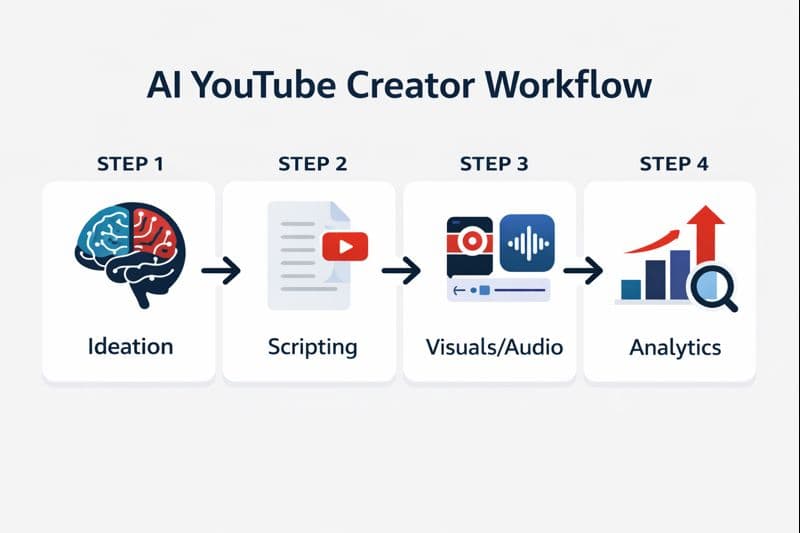
Infographic showing the 4-step AI workflow for YouTube creators: Ideation, Scripting, Production, and Analytics
Best AI Script Writing & Ideation Tools
Great videos start with great ideas.
6. ChatGPT (GPT-4o)
The undisputed king. Use it for brainstorming, outlining, and even writing full scripts.
* Pro Prompt: *"Act as a professional YouTuber with 1M subs. Write a hook for a video about [topic] that creates a curiosity gap in the first 10 seconds."*
7. Claude 3.5 Sonnet
Many creators find Claude writes more "human-sounding" scripts than ChatGPT. It's excellent for nuance, storytelling, and avoiding that robotic AI tone.
8. Jasper AI
Built specifically for marketers. Jasper understands sales psychology and can write high-converting video scripts that sell products or drive clicks.
9. Tubespanner
A dedicated toolkit for YouTubers. It generates titles, script outlines, and even community tab posts based on what's trending.
Best AI Voice Generators (Text-to-Speech)
Stop using robotic Siri voices. These sound indistinguishable from humans.
10. ElevenLabs (The Industry Leader)
ElevenLabs is simply the best. The emotion, pacing, and breath control are terrifyingly realistic. You can clone your own voice or use their premium library.
- Top Use: Dubbing videos into other languages to 10x your reach.
11. Murf.ai
Great for explainer videos. Murf offers "studio quality" voices that sound professional and polished, perfect for corporate or educational content.
Best AI Thumbnail Generators
Click-Through Rate (CTR) is everything. No click = no view.
12. Midjourney
The most powerful AI image generator. It creates mind-blowing, high-definition thumbnail backgrounds that impossible to shoot IRL.
* Tip: Use it for "hyper-realistic" compositions or surreal objects.
13. ThumbnailTest.com
Not a generator, but an optimizer. It uses AI to predict which of your thumbnail options will get the highest CTR before you publish.
14. Canva (Magic Studio)
Canva has integrated huge AI power. "Magic Expand" can un-crop photos, and "Magic Grab" lets you move subjects around in a flat image.
Best AI SEO & Analytics Tools
Ranking #1 in search is how you get passive views for years.
15. VidIQ (AI Coach)
VidIQ is your 24/7 channel consultant. Their AI Coach analyzes your channel and tells you exactly what video to make next to get views.
- Best Feature: "Daily Ideas"—predicts high-potential video topics daily.
16. TubeBuddy
Similar to VidIQ but strong on A/B testing titles and descriptions. Its "Suggested Tags" feature is powered by ranking data.
17. Taja.ai
A newer tool that focuses purely on YouTube SEO. It writes your Title, Description, and Chapters instantly based on your video file.
Best AI Dubbing & Translation Tools
Top creators like MrBeast dub their content to go global.
18. Rask.ai
Rask dubs your video into 60+ languages AND lip-syncs your mouth to match the new language. It's game-changing for global growth.
More Essential AI Tools
19. Gling
Built for YouTubers. It automatically cuts out "ums," "ahs," and silences from your raw footage.
20. Adobe Podcast Enhance
Turns bad phone audio into studio-quality sound in one click. Free and incredible.
21. Runway Gen-2
Text-to-Video generation. Need a clip of a "cyberpunk city in rain" for B-roll? Runway generates it from scratch.
22. Sora (OpenAI)
(If available) The cutting edge of video generation. Capable of creating 60-second realistic scenes.
23. Perplexity.ai
Better than Google for research. Use it to fact-check your scripts and find obscure data points instantly.
24. Notion AI
Great for organizing your content calendar and turning messy notes into structured video plans.
25. Tella
Screen recording on steroids. It automatically zooms in on your mouse clicks and smooths out camera movements.
Expert Insight: How to Build an AI Stack
Don't try to use all 25. Here is the "Starter Automation Stack" I recommend:
- Ideation: ChatGPT
- Scripting: Claude 3.5
- Voice: ElevenLabs
- Editing: InVideo AI (for faceless) or Descript (for personal brand)
- SEO: VidIQ
Pro Tip
Pro Tip: The goal of AI isn't to replace *you*. It's to replace the *boring stuff* so you can spend 100% of your energy on being creative and connecting with your audience.
Conclusion: Adapt or Die?
That sounds dramatic, but in 2026, a creator using these tools can produce 5x the content at higher quality than a creator working manually. The gap is widening.
Start with one tool. Master it. Then add another.
Which AI tool are you most excited to try? Let me know in the comments (or better yet, make a video about it!).
---
Ready to grow faster?
- YouTube Title Generator – Free AI tool to write viral titles
- YouTube Script Generator – Get a tailored script in seconds
Topics
❓Frequently Asked Questions
What is the best free AI tool for YouTube?
For video editing, **DaVinci Resolve** (free version) combined with **CapCut** offers incredible AI features for free. For scripting, the free version of **ChatGPT** is indispensable. **Adobe Podcast Enhance** is also a powerful free tool to clean up your audio.
Can I monetize AI-generated videos on YouTube?
Yes, absolutely. YouTube monetizes AI content as long as it follows Community Guidelines. However, YouTube requires you to **label** realistic AI content (like deepfakes or realistic scenes) using the 'Altered Content' checkbox during upload. Non-compliance can lead to demonetization.
Do AI voiceovers get demonetized?
Generally, no. High-quality AI voices (like ElevenLabs) are fully monetizable. However, 'low-effort' content with robotic tech-to-speech reading Wikipedia articles is considered 'Repetitious Content' and may be demonetized. The key is adding value with editing, visuals, and script quality.
What is the best AI video editor for beginners?
**InVideo AI** is best for complete beginners who want automation (text-to-video). For those wanting to learn editing, **Descript** is the most intuitive because you edit via text. **CapCut Desktop** is also fantastic for its ease of use and built-in AI effects.
How can AI help with YouTube SEO?
AI tools like **VidIQ** and **TubeBuddy** analyze millions of videos to suggest high-traffic keywords and titles. Tools like **Taja.ai** can watch your video and write perfectly optimized descriptions, tags, and chapters to help you rank in search results.
Free tools for this topic
Apply what you just read with free creator tools — no signup required.