Walk into any grocery store and you can identify a Coca-Cola can from fifteen feet away without reading a single word. You recognize it from the curve of the bottle shape, the specific shade of red, the font. That's what great branding does — it makes recognition instantaneous.
Your YouTube channel needs that same recognition engine. In a platform where viewers make split-second decisions about whether to click, subscribe, or scroll past, your visual identity is doing a massive amount of the persuasion work before a single frame of your video plays.
The problem is that most creators approach branding entirely backwards. They launch a channel, post a few videos with a default avatar and no banner, and wonder why subscriber growth feels like pulling teeth. Then they slap together a quick logo six months later when they "have time," and it looks exactly like it was made in a six-minute rush — which it was.
Real channel branding isn't just about looking pretty. It's a strategic communication system. Every color, every font choice, every element of your banner sends a signal to your potential audience about who you are and whether you're worth their time.
This guide breaks down every single layer of that system.
Important
Quick Answer — YouTube Channel Branding in 2026:
1. Your logoneeds to work at 98x98px — if it's unreadable at small sizes, it's not functional
2.Your bannermust be designed for 2560x1440px but tested at 1546x423px (safe zone)
3.Your color paletteshould be 2-3 colors maximum — consistency beats complexity every time
4.Your channel introshould be 5 seconds or shorter — viewers skip anything longer
5.Brand consistency across all touchpoints (thumbnail, banner, social) is more powerful than any single element
Not sure about rule 2? The YouTube Banner Size 2026 guide walks through every banner dimension, the safe area, and how to check your design on TV, desktop, and mobile before you upload.
Why Channel Branding Matters More Than Most Creators Realize
Let me give you a number: YouTube has over 800 million videos and 50 million active creator channels as of 2026. The platforms that survive in that environment are the ones that feel like a destination, not just a content dump.
Think about the channels you subscribe to and actually return to. There's an almost universal characteristic among them — they feel coherent. The thumbnails use the same fonts and colors. The channel art matches the thumbnail aesthetic. The logo is clean and recognizable even when it's tiny. This coherence is not accidental. It's the result of intentional branding decisions.
Here's the practical impact:
On subscriber conversion: When someone lands on your channel page after watching one of your videos, they're making a decision in about three seconds. A well-branded channel page communicates legitimacy, professionalism, and longevity. A channel with no banner and a blurry profile picture communicates the opposite, regardless of video quality.
On click-through rates: Thumbnails that share a consistent visual style trained your audience to recognize your content the moment it appears in their feed. Before they read the title, the familiar colors and layout have already started pulling the click.
On long-term growth: A cohesive brand creates the foundation for monetization beyond AdSense — merchandise, courses, sponsorships, and community platforms all benefit from a recognizable visual identity that viewers feel connected to.
Part 1: Your YouTube Profile Picture (Channel Logo)
This is the most technically demanding element of YouTube branding because it has to work in drastically different contexts simultaneously.
Your profile picture appears:
- As a 98x98px circle on YouTube comments
- As a 48x48px circle on mobile notifications
- Full-size at 800x800px on your channel homepage
- As the small icon next to your channel name in search results
The golden rule: design for 98x98px first, then scale up.
Most creators make the fatal mistake of designing something intricate and detailed that looks great at full desktop size and becomes a blurry mess at comment scale.
What Makes a Strong YouTube Logo
If you're a personal creator (face-revealed): A clean, high-contrast headshot with a solid background color often outperforms any icon-based logo. People subscribe to personalities on YouTube. Your face is your brand. Take a quality photo with good lighting, crop it tight, and use a background color that matches your overall channel palette.
If you're a brand, business, or faceless channel: A text-based "wordmark" or a simple icon/symbol works best. Think in shapes, not details. A circular outline, a bold letter, a simplified icon — the simpler it reads at small sizes, the better. Avoid gradients, thin lines, and detailed textures entirely.
Technical specifications for YouTube profile pictures:
- Minimum size:98 x 98px
-Recommended size:800 x 800px
-Maximum file size:4MB
-Format:PNG (for transparency) or JPG
-Shape: YouTube displays it as a circle — keep all important elements within the center 75% of the square
Tools worth using: Canva's YouTube Logo Maker (free tier is sufficient for most creators), Adobe Express, or if you want something more custom, Looka generates genuinely professional logo options from a questionnaire. For AI-generated logo concepts as a starting point, use our YouTube AI Thumbnail Generator to prototype visual concepts quickly.
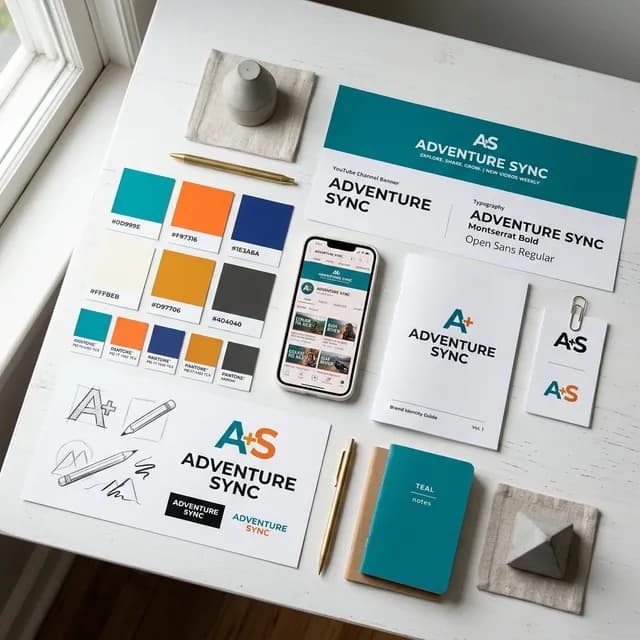
YouTube channel branding elements mood board with logo, colour palette, fonts and banner printed materials on white desk
*A cohesive brand system — logo, color palette, typography, and channel art — is the foundation every successful YouTube channel eventually builds. Starting intentionally saves you dozens of hours of future rebrand work.*
Part 2: The YouTube Channel Banner (Art) — The Biggest Branding Real Estate You Have
Your channel banner is the most visible branding element on your entire channel page. At 2560x1440px, it's also the most technically complex to design correctly because it renders completely differently across devices.
The Three Safe Zones You Must Understand
YouTube compresses and crops your banner image based on the viewer's device:
| Device | What They See |
|---|---|
| Desktop (Full) | 2560 x 423px (wide letterbox view) |
| Tablet | 1855 x 423px |
| Mobile | 1546 x 423px |
| TV | Full 2560 x 1440px |
This means your actual design must work within these three nested areas simultaneously:
-TV Safe Zone:Full 2560 x 1440px — the entire canvas. Only TV viewers see all of this.
-Desktop Safe Zone:The central 1546 x 423px strip. This is what most viewers see.
-Text & Logo Safe Zone: Central 1235 x 338px — never place essential elements outside this zone.
The practical implication:Put everything important (your channel name, tagline, upload schedule, and social handles) inside the central 1235x338px box. Use the outer areas for background textures, patterns, or decorative elements that don't contain critical information.
What Belongs on Your YouTube Banner
Your channel banner should answer three questions for a first-time visitor in under five seconds:
1.What is this channel about?(Content category or channel name)
2.Why should I subscribe?(Unique value or differentiator)
3.When do you upload? (Schedule, if you're consistent)
Optional but effective: your social media handles and a simple visual representation of your content (screenshot from a video, a hero image, or an illustration).
What NOT to put on your banner:
- Cluttered text that reads like a résumé
- Low-resolution images that look pixelated on TV screens
- Dark text on dark backgrounds or light text on light backgrounds
- Outdated information (if you change your upload day, update the banner)
Pro Tip
Design Hack:In Canva, search for "YouTube Channel Art" and filter to 2560x1440px. After designing, use Canva's preview feature on mobile view before downloading. If the essential information is cropped out on mobile, redesign the layout. More than 70% of YouTube traffic comes from mobile devices — what mobile shows is what most viewers actually see.
Part 3: Building Your YouTube Color Palette
Color is the most powerful subconscious branding tool available to creators. Before a viewer reads your channel name, their brain has already categorized your brand based on the colors they associate with it.
The Science Behind Color in YouTube Branding
Color psychology in digital media is well-researched, and specific color associations are remarkably consistent across Western audiences:
| Color | Psychological Association | Best YouTube Niches |
|---|---|---|
| Red/Orange | Energy, urgency, excitement | Gaming, fitness, motivation |
| Blue | Trust, reliability, intelligence | Finance, tech, education |
| Green | Growth, health, money | Cooking, sustainability, investing |
| Purple | Creativity, mystery, luxury | Beauty, spirituality, art |
| Black/White | Premium, minimal, sophisticated | Tech reviews, luxury lifestyle, cinema |
| Yellow | Optimism, clarity, happiness | Kids content, travel, comedy |
You don't need to pick a color because psychology says so — you need to pick colors that feel authentically connected to your content and that you can maintain consistently for years. The most important thing is *coherence*, not any specific color choice.
Building a 3-Color Palette That Works
The most functional YouTube brand palette has three components:
1. Primary Color — The dominant brand color. Used most prominently in your logo, banner background, and thumbnail accents. This is what people will associate with your channel after repeated exposure.
2. Secondary Color — A complementary or contrasting color that creates visual interest. Used for highlights, call-to-action elements, and secondary design elements in thumbnails.
3. Neutral — Usually black, white, dark gray, or off-white. Used for text and backgrounds. Neutrals do the heavy lifting of readability without adding visual noise.
The palette creation process:
- Choose your primary color intuitively, based on your content personality
- Use a color wheel tool (Adobe Color, Coolors.co, or Paletton) to find a complementary or triadic match as your secondary
- Choose your neutral based on whether your overall aesthetic is light or dark
Once you have your three hex codes, never deviate from them in anything that represents your channel publicly.
Part 4: Typography — The Unsung Hero of Channel Branding
Most creators never think consciously about fonts. They use whatever Canva suggests, or whatever looks "cool" on a given thumbnail. The result is thumbnails that look inconsistent from week to week, even if the colors are right.
Your channel needs two fonts maximum:
A Display Font: Bold, attention-grabbing. Used for main text on thumbnails, your channel name on banners, and headline elements. Must be legible at thumbnail scale. Avoid thin stroke fonts entirely — they disappear at small sizes.
A Body Font: Clean, highly readable. Used for any longer text descriptions, secondary thumbnail text, and watermarks. High x-height fonts (where lowercase letters are relatively tall) read better small.
Font sources for creators:
- Google Fonts — Free, enormous variety, and the fonts load fast if you embed them on web platforms
- DaFont — Good for display fonts with unique personality
- Adobe Fonts — Included with Creative Cloud subscriptions
Font pairings that work well on YouTube thumbnails:
- Montserrat Bold + Open Sans(clean, modern, universal)
-Bebas Neue + Lato(bold impact + readability)
-Anton + Roboto(aggressive display + clean body)
Once you pick your fonts, use them on every single thumbnail you make from that day forward. The compounding recognizability effect takes about 20-30 thumbnails to become noticeable and then grows significantly over time.
To optimize your thumbnails alongside your branding work, our YouTube Thumbnail Generator helps you test text placement and readability. And once you've nailed your visual identity, use our YouTube Title Generator to craft the text that sits on those thumbnails.
Part 5: Your YouTube Channel Intro — The Biggest Mistake Most Creators Make
I'm going to say something that will contradict what you've probably seen advised in older YouTube tutorials:your intro should be five seconds or shorter, and it's perfectly fine to have no intro at all.
The classic YouTube advice about intros is rooted in a different era of the platform. When watch time algorithms were less sophisticated and retention curves weren't as aggressively penalized, a 15-30 second animated intro with dramatic music felt like "professional" YouTube.
In 2026, that intro is killing your audience retention.
YouTube measures viewer percentage still watching at the 30, 60, and 90-second marks and uses this as a major ranking signal. Every second of intro animation before your video actually starts is a second of guaranteed retention drop — people who clicked expecting content and instead got an animation bump they've seen before instinctively skip forward or leave entirely.
What an Effective 2026 YouTube Intro Looks Like
Option A — The Brand Flash (Recommended): A clean, 2-3 second animated logo reveal at the very start of the video before cutting straight into content. Clean, professional, and short enough that audience retention tools barely register it as a drop-off point.
Option B — The Verbal Ident: Skip animation entirely. Open mid-action, pause after the hook, and your channel name appears as a lower-third text overlay for 2 seconds. Zero video production overhead, perfectly functional.
Option C — No Intro: Completely valid. MrBeast doesn't have a traditional intro. Neither do most of the fastest-growing channels in 2026. Open strong, cut to black very briefly if you want a "chapter" feel, and get into your content.
If you must make an animated intro:
- Maximum 5 seconds, ideally 3
- Use your exact brand colors and font
- Export at 1080p minimum, 4K preferred for future-proofing
- Keep the audio subtle — many viewers have their phone volume low
Tools for creating a YouTube intro:
- Canva(free) — Has pre-made animated logo templates you can modify with your brand colors
-Adobe Premiere + After Effects— For custom animations if you have editing skills
-Placeit.net — Template-based intro makers, no editing skills required, reasonable one-time purchase cost
Once your intro is set, optimize the content that comes after it. Our YouTube Description Generator helps you write descriptions that capture both viewer intent and algorithm signals right below every video.
Part 6: The Watermark and End Screen — Completing Your Brand System
Two additional branding elements that most guides skip, but that create meaningful brand recognition:
Video Watermark
YouTube allows you to add a transparent channel logo watermark to all your videos through YouTube Studio → Customization → Branding. This small logo appears in the bottom-right corner of every video during playback.
The watermark has an additional function beyond branding: when viewers click it, it brings up a Subscribe button. This means it's also a passive subscriber acquisition tool running on every video in your library simultaneously.
Watermark specifications:
- Minimum 150 x 150px, recommended 800 x 800px
- PNG with transparent background
- Use your logo with just enough opacity to be visible without being distracting (60-70% opacity is usually right)
End Screen Design
Your end screen is the final 20 seconds of your video where you can place subscribtion prompts, video cards, and playlist links. While YouTube auto-handles the interactive elements, the *visual design* of what appears behind those cards is entirely yours.
Many top creators take a 1-2 second "branded outro card" — a simple screen in their brand colors with their logo — and hold on it while the end screen elements are active. This creates a consistent branded moment at the video's end that viewer's subconsciously associate with your channel over time.
Part 7: Channel Description — The Often-Ignored Branding Text
Your channel description is both a branding document and an SEO asset. YouTube and Google index it, and it appears on your About page plus sometimes in search snippets.
Structure your channel description like this:
Line 1-2: Who you are and what your channel is about. Include your primary keyword naturally. ("We publish weekly tutorials on YouTube channel growth, SEO strategy, and content creation for creators at every level.")
Line 3-4: What makes your channel different. Your unique value proposition or content frequency.
Line 5-6: Your upload schedule and platform links.
Include naturally:Your main keyword, content category, upload frequency, and location (if relevant). Keep it under 1,000 characters.
For building out the rest of your channel's text-based identity — including keyword-rich About sections — use our YouTube Tag Generator to identify the exact search terms your ideal audience is using, and our YouTube Description Generator to structure that language effectively.
Part 8: Consistency Across Platforms — The Brand's Multiplier
Your YouTube branding doesn't end on YouTube. If you maintain any presence on Instagram, TikTok, Twitter/X, or a website, your visual identity should be consistent across all of them.
This isn't about using the exact same image everywhere. It's about your audience being able to identify you immediately on any platform based on the same core recognition triggers: your color palette, your logo, your font treatment.
Practical consistency checklist:
- Same or closely related profile picture across all platforms
- Same color palette in content created for every platform
- Same font for text overlays in Reels, Shorts, and TikToks
- Same logo watermark on all video content
When your subscriber sees your Instagram Reel in their feed, the color palette should make them think "that's [Your Channel Name]" before they read anything. This cross-platform recognition effect compounds your brand equity exponentially over time.
Backlink Resources and Official References
Building your brand knowledge alongside your technical YouTube skills is essential for long-term growth. The strategies in this guide align with established frameworks from leading sources:
-Canva's Brand Kit Guide— Excellent practical walkthrough on building a consistent visual brand system from scratch, directly applicable to YouTube
-YouTube Creator Academy — Channel Art— YouTube's official guidance on channel art specifications and banner design best practices
-Google Fonts Knowledge Hub— Deep dive into choosing typography that works across digital platforms, including video
-Adobe Color Wheel — Industry standard tool for building harmonious color palettes for your brand
Building on Your Brand Foundation
Strong channel branding is the foundation that everything else grows from. Once your visual identity is locked in, every piece of content you produce has a consistent professional feel that compounds subscriber trust over months and years.
The next step after establishing your brand is maximizing the discoverability of every video you put out. Use our YouTube SEO Tools to optimize your video metadata, and our YouTube Earnings Calculator to track how your brand-driven subscriber growth translates into real revenue at every milestone.
For more channel growth fundamentals, read our guide on how to get more views on YouTube in 2026 — which pairs directly with the brand recognition strategies covered here. And if you're building in the gaming space specifically, our Gaming YouTube Growth Strategies guide covers how a strong brand identity plays into gaming channel algorithm performance.
Topics
❓Frequently Asked Questions
What size should a YouTube channel logo be?
YouTube recommends uploading your profile picture at 800 x 800px, though 98 x 98px is the minimum. Crucially, YouTube displays your logo as a circle and at small sizes in comments and notifications. Design your logo to be clearly recognizable at 98 x 98px first — avoid thin details, complex textures, or gradient-heavy designs that become muddy at small scales.
What are the correct YouTube banner dimensions for 2026?
Upload your YouTube channel banner at 2560 x 1440px with a file size under 6MB. However, the safe zone for all-device visibility is the central 1546 x 423px strip. Most importantly, keep all critical text and logos within the central 1235 x 338px area, since this is what every viewer sees regardless of whether they're on mobile, tablet, desktop, or TV.
How many colors should a YouTube channel use for branding?
Two to three colors is the standard for effective YouTube channel branding. Choose one primary brand color (your dominant identifier), one secondary/accent color for contrast and highlights, and one neutral (black, white, or dark gray) for text and backgrounds. More than three colors creates visual inconsistency and makes your brand harder to recognize at a glance.
How long should a YouTube intro be in 2026?
Five seconds or shorter — ideally three seconds. Audience retention analytics show that even short intros cause measurable drop-off before your content starts, which hurts your video's ranking signals. In 2026, the most effective approach is a brief animated logo reveal (2-3 seconds) or skipping a traditional intro entirely and opening mid-action. Longer intros actively harm your channel's performance.
Do I need professional design skills to brand my YouTube channel?
No. Free tools like Canva have YouTube-specific templates for banners, logos, and thumbnails that require no design background. Adobe Express offers similar functionality. The most important factor is consistency — using the same colors, fonts, and visual style across all your content matters far more than the technical sophistication of your individual design choices.
Can I change my YouTube branding after I start growing?
Yes, but do it strategically. A minor refresh (slightly updated logo, new banner layout) is fine and often healthy every 1-2 years. A complete rebrand — entirely different colors, new channel name, different logo — can confuse existing subscribers and temporarily hurt your click-through rates as your audience loses the visual recognition cues they've built up over time. If a major rebrand is necessary, pre-announce it across your content and give subscribers context.
What file format should I use for my YouTube logo and banner?
Use PNG format for your YouTube profile picture and channel banner. PNG supports transparent backgrounds (critical for logos that need to work over different colored surfaces), maintains high image quality without JPEG compression artifacts, and is supported universally by YouTube. For the banner, avoid JPEGs that show compression artifacts especially in solid color areas.
Free tools for this topic
Apply what you just read with free creator tools — no signup required.