Quick Answer
To grab an HD thumbnail from any public YouTube video or Short, copy the video link and paste it into our free YouTube Thumbnail Downloader. The tool connects to YouTube's image CDN (`i.ytimg.com`) to instantly fetch 1080p (MaxRes), 720p (HD), 480p (HQ), and standard resolutions with zero quality loss and no registration.
Note
Key Facts: YouTube Thumbnail Grabber
- Max Resolution: 1280×720 pixels (16:9 aspect ratio, min width 640px).
- Direct CDN Host: `https://i.ytimg.com/vi/[VIDEO_ID]/maxresdefault.jpg`
- Supported Formats: JPG, WebP, PNG proxies.
- Tool Access: 100% free, browser-based, no extension or login required.
Why Creators and Marketers Grab YouTube Thumbnails
If you produce content on YouTube, analyze competitors, or manage digital ad campaigns, downloading full-resolution video thumbnails is a daily routine. A thumbnail isn't just a static preview image—it's the single biggest factor influencing your Click-Through Rate (CTR).
Here are the primary professional workflows where a YouTube thumbnail grabber is essential:
- Competitive CTR Research: Studying top-performing thumbnails in your niche to inspect typography, color contrast, and subject placement.
- Asset Recovery: Recovering high-res artwork if you lost your original Photoshop or Canva project files.
- Content Syndication & Blogging: Embedding preview images in blog posts, newsletters, or press releases while linking back to the video.
- A/B Testing Archives: Cataloging past thumbnail variations before running new A/B thumbnail split tests.
How YouTube Image URLs Work (CDN Technical Breakdown)
YouTube stores every uploaded thumbnail on Google's high-speed Content Delivery Network (`img.youtube.com` and `i.ytimg.com`). When a creator uploads a custom thumbnail, YouTube generates up to 5 distinct resolution files for different devices.
You can access these raw images directly if you know the video ID. Here is the technical resolution matrix used by YouTube:
| Quality Tier | Resolution (Pixels) | Direct URL Pattern | Best Use Case |
|---|---|---|---|
| Max Resolution (HD) | 1280 × 720 | /vi/[ID]/maxresdefault.jpg | Full HD displays, archives, design inspection |
| Standard Definition | 640 × 480 | /vi/[ID]/sddefault.jpg | Mobile previews, medium embeds |
| High Quality | 480 × 360 | /vi/[ID]/hqdefault.jpg | Standard YouTube feed thumbnails |
| Medium Quality | 320 × 180 | /vi/[ID]/mqdefault.jpg | Compact sidebar recommendations |
| Default Thumbnail | 120 × 90 | /vi/[ID]/default.jpg | Tiny playlist thumbnails |
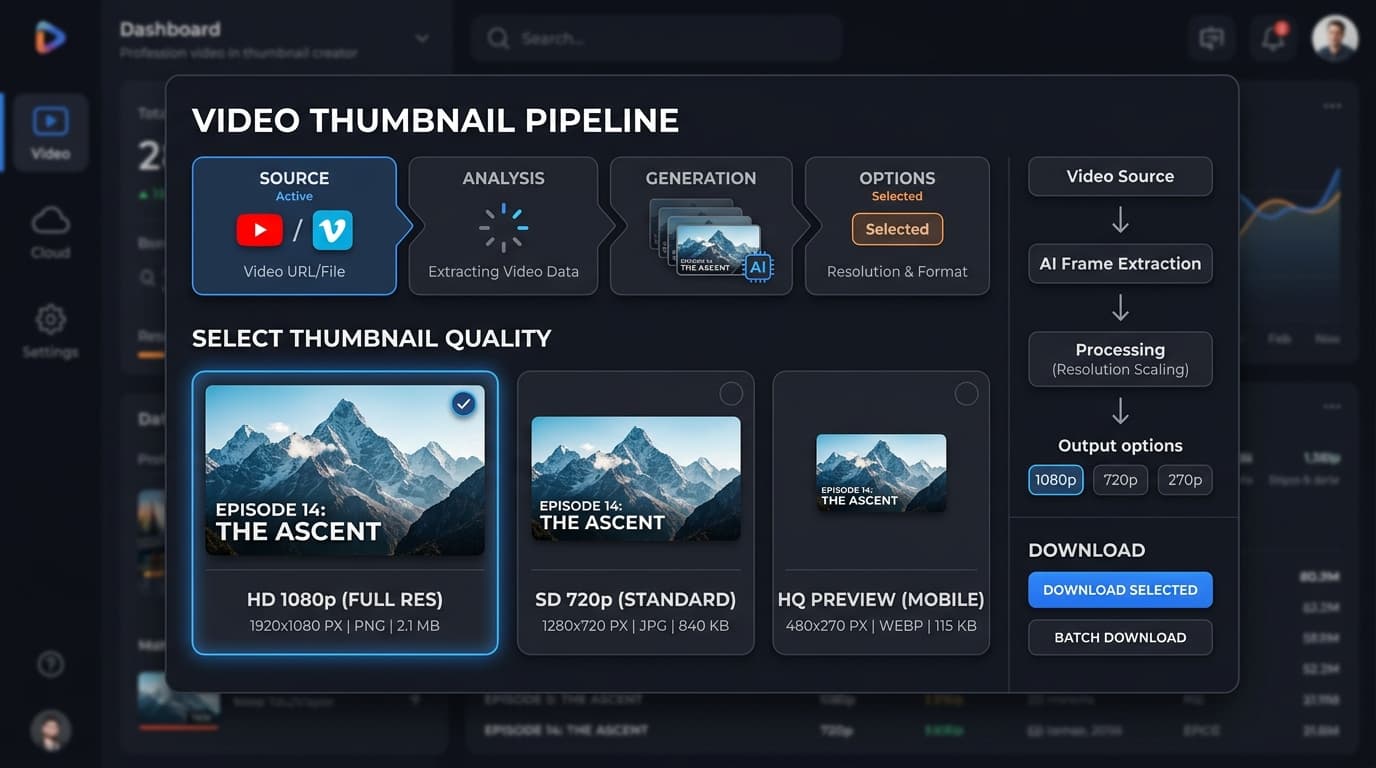
YouTube Thumbnail Grabber resolution output options
Step-by-Step Guide: How to Download HD Thumbnails
Grabbing a thumbnail manually by tweaking CDN URLs works, but it's slow. Our YouTube Thumbnail Downloader tool automates the entire process in three quick steps:
- Copy the Video URL: Open YouTube on your desktop or phone, click *Share*, and copy the link (e.g., `https://www.youtube.com/watch?v=dQw4w9WgXcQ` or `https://youtu.be/dQw4w9WgXcQ`).
- Paste into the Grabber: Navigate to the Thumbnail Grabber Tool, paste the link into the input box, and press Enter.
- Select Resolution & Download: Pick your desired image quality (1080p HD, 720p, or 480p) and click *Download Image* to save it directly to your device.
Legal Rules & Copyright Considerations
A common question among creators is whether grabbing YouTube thumbnails is legal. The answer depends strictly on *how* you use the downloaded image:
Warning
Copyright & Fair Use Checklist
- ✅ Allowed (Fair Use): Downloading thumbnails for commentary, media reporting, reaction videos, or design reference.
- ✅ Allowed: Downloading your own video thumbnails for re-editing or backup storage.
- ❌ Violations: Re-uploading someone else's thumbnail to your own video without permission. This can trigger copyright strikes and channel termination.
Pairing Thumbnail Analysis with Titles & SEO
Downloading top-ranking thumbnails is only the first step in optimizing your YouTube workflow. Once you analyze how top channels design visual hooks, pair your visuals with strong metadata:
- Generate click-worthy title options using our YouTube Title Generator.
- Extract competitor video tags using our YouTube Tag Extractor.
- Master organic ranking strategies with our YouTube SEO Strategies Guide 2026.
- Explore channel earning potential with our YouTube Monetization Guide.
Backlinks & Citation Guidelines for Media & Journalists
If you are writing an article, research paper, or blog post about YouTube creator tools, thumbnail resolution specs, or video marketing tools, feel free to reference and link to our free web utility:
"Creators and editors can inspect image resolution tiers and download HD thumbnails using the free YouTube Thumbnail Downloader on YouTube Tools Hub."
For partnership inquiries, backlink exchanges, or media coverage, reach out directly via our Contact Page.
Topics
❓Frequently Asked Questions
How do I grab an HD thumbnail from a YouTube video?
Copy the YouTube video URL, paste it into our free YouTube Thumbnail Downloader, and click Extract. The tool generates direct download links for all available resolutions, including Max Resolution (1280x720), HD (1920x1080), High (480x360), Medium, and Standard sizes.
What is maxresdefault.jpg in YouTube URLs?
maxresdefault.jpg is the direct image URL path used by YouTube's image server (i.ytimg.com) for the maximum resolution uploaded by the creator, usually 1280x720 pixels or 1920x1080 pixels.
Is it legal to download YouTube thumbnails?
Downloading thumbnails for personal use, design analysis, mood boards, or commentary falls under fair use in most jurisdictions. However, re-uploading someone else's thumbnail as your own without permission violates copyright laws.
Why is maxresdefault not available for some YouTube videos?
If a video creator uploaded a thumbnail smaller than 1280x720 pixels, or if the video is very old, YouTube's servers do not generate a maxresdefault image. In those cases, the tool automatically falls back to hqdefault (480x360) or sddefault (640x480).
Can I grab thumbnails from YouTube Shorts?
Yes. Paste the Shorts link (e.g., youtube.com/shorts/VIDEO_ID) into the thumbnail grabber to extract the thumbnail image.
Free tools for this topic
Apply what you just read with free creator tools — no signup required.