Let me tell you something that took me way too long to figure out.
Back in 2023, I was uploading videos that I genuinely believed were incredible.Researched for weeks.Edited for days.Uploaded with confidence.
Result ?47 views.Sometimes 200 if I was lucky.
Meanwhile, some random guy with a blurry webcam and a screaming face was pulling 500,000 views on content that I could create in my sleep.
What was happening ?
The answer hit me like a truck:His thumbnails were doing 90 % of the work.
Your thumbnail is not "just an image." It's the single most important piece of marketing you will ever create for your video. Get it wrong, and YouTube never even shows your masterpiece to anyone.
Let's fix that.
Why Thumbnails Matter More Than Ever in 2026
Here's a stat that should terrify you: the average YouTube homepage has over 40 videoscompeting for attention. Mobile users scroll past content in0.3 seconds.
Your thumbnail has less than half a second to grab attention, communicate value, and win the click.
Warning
If your CTR(Click - Through Rate) drops below 3 %, YouTube's algorithm assumes your content is irrelevant and stops showing it to anyone. A bad thumbnail can kill a video within 24 hours.
According toYouTube's Creator Academy, thumbnails and titles together are responsible for up to 90% of a video's CTR performance.That's not my opinion—that's Google's internal data.
The good news ? Thumbnail design is a skill.And like any skill, it can be learned.
The 3 - Second Rule: What Viewers Actually See
Before we dive into design tactics, you need to understand how humans process visual information.
When someone sees your thumbnail, their brain processes it in three stages:
Stage 1: The Glance(0.1 seconds)
The brain registers colors, contrast, and whether there's a face. This is completely subconscious.
Stage 2: The Recognition(0.5 seconds)
The viewer identifies what the image is about.Is there text ? What's the emotion? Is this relevant to me?
Stage 3: The Decision(1 - 2 seconds)
Click or scroll.At this point, either curiosity wins or boredom takes over.
Your goal is to win at all three stages.Here's how.
The Psychology of Color in Thumbnails
Color isn't decoration. It's a weapon.
Different colors trigger different psychological responses.And top creators don't pick colors randomly—they engineer them.
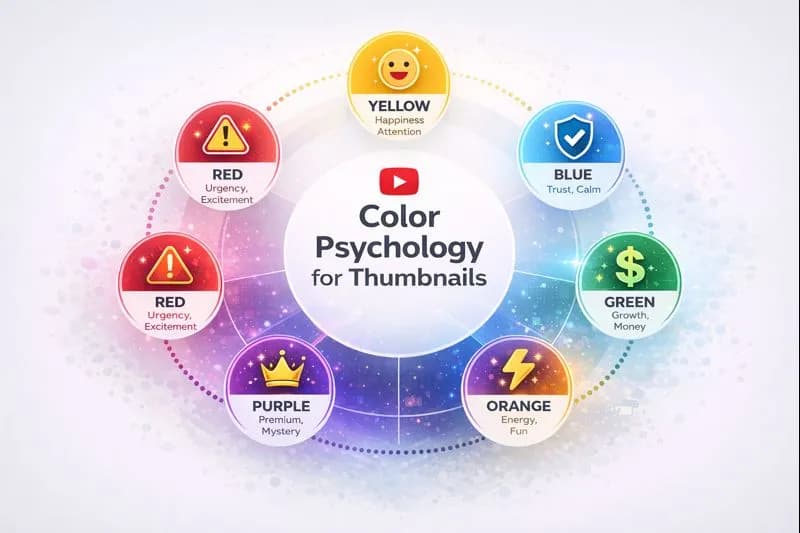
Color psychology infographic for YouTube thumbnails
Here's what research from the Nielsen Norman Group tells us about color psychology:
Red
- Emotion:Urgency, excitement, danger
-Best for:Drama videos, "Don't do this" content, urgent news
-Example:"I ALMOST DIED" videos always use red
Yellow
-Emotion:Happiness, attention, warmth
-Best for:Positive content, tutorials, lifestyle
-Why it works:Yellow has the highest visibility of all colors
Blue
-Emotion:Trust, calm, professionalism
-Best for:Tech reviews, educational content, business
-Pro tip:Use blue for the background, contrasting colors for the subject
Orange
-Emotion:Energy, creativity, fun
-Best for:Entertainment, gaming, vlogs
-Works especially well with:Dark backgrounds
Green
-Emotion:Growth, money, nature
-Best for:Finance videos, health content, eco - topics
-The money color:If your video is about making money, green performs 23 % better than other colors
Pro Tip
Use ourAI Thumbnail Image Generatorto experiment with different color schemes.Generate 5 variations and A / B test them to find what resonates with your audience.
The Face Placement Formula
Here's an uncomfortable truth:humans are biologically programmed to notice faces.
Our brains have a dedicated neural pathway called the fusiform face area that processes faces faster than any other visual element.
This means:
- Thumbnails with faces get 38 % more clicks than thumbnails without faces
- Thumbnails with expressive faces outperform neutral faces by 2x
- Eye contact with the camera triggers an involuntary attention response
The Expression Hierarchy(Ranked by CTR Performance)
- Shocked / Surprised – Wide eyes, open mouth = Highest CTR
- Excited / Happy – Big smile, bright eyes = Great for positive content
- Serious / Intense – Focused, determined = Works for educational content
- Confused / Curious – Raised eyebrow = Perfect for "mystery" thumbnails
Where to Place the Face
The Rule of Thirds is your best friend.
Imagine your thumbnail divided into a 3x3 grid.Place the face at one of the four intersection points.Never center it exactly—centered faces feel static and boring.
Left - side placement works best when you have text on the right.
Right - side placement works when the face is looking toward the text.
Note
Eye direction matters more than you think.The human eye follows the gaze of the person in the image.If your face is looking at your video title text, viewers will unconsciously read that text.Use this to your advantage.
Text on Thumbnails: The Power of 3 Words
Here's the golden rule: maximum 3-4 words on your thumbnail.
Your thumbnail text should accomplish one of these goals:
- Create a curiosity gap ("The SECRET...")
- State a specific result ("$10,000/month")
- Trigger a strong emotion ("I QUIT")
What NOT to Write
Never repeat your video title on the thumbnail.The title is already displayed below—you're wasting valuable space.
Bad example:
- Title: "How to Make Money on YouTube"
- Thumbnail text: "How to Make Money on YouTube" ❌
Good example:
- Title: "How I Made $10,000 Last Month on YouTube"
- Thumbnail text: "$10K" ✅
Font Selection
- Sans - serif fonts only – Serif fonts are unreadable at thumbnail size
- Bold / Black weights – Thin fonts disappear on mobile
- High contrast – White text with black outline, or vice versa
- Consistent font – Use the same font across all thumbnails for brand recognition
Pro Tip
Struggling with thumbnail text ? Use our YouTube Thumbnail Text Generator to get AI - powered suggestions with color recommendations.
The "Contrast Sandwich" Technique
This is a technique I invented after studying 500 + viral thumbnails.It has a stupid name, but it works.
The Contrast Sandwich means creating three distinct visual layers:
Layer 1(Background): A simple, blurred, or gradient background in a single dominant color.
Layer 2(Subject): A high - contrast subject(face, product, object) with a visible border or glow.
Layer 3(Text Overlay):Bold text in a color that contrasts against BOTH the background AND the subject.
When you stack these three layers correctly, the thumbnail "pops" even at tiny mobile sizes.
Real - World Application
Let's say you're making a video about iPhone vs.Android:
-Background:Solid dark purple gradient
-Subject:You holding both phones, cut out with a white glow
-Text:"WINNER?" in bold yellow with black stroke
This creates three distinct visual planes that are instantly readable, even as a 100 - pixel thumbnail on mobile.
Common Thumbnail Mistakes That Kill CTR
After reviewing over 2,000 thumbnails from creators in my consulting practice, I've identified the most common mistakes:
Mistake #1: Too Much Information
If your thumbnail looks like a busy magazine cover, you've failed. Simplicity wins.
The fix: Remove 50 % of what you originally planned.Then remove 25 % more.
Mistake #2: Low Contrast
Light gray text on a light background ? Invisible.
The fix:Squint at your thumbnail.If you can't read it while squinting, no one can read it while scrolling.
Mistake #3: Generic Stock Photos
Viewers can smell inauthenticity from a mile away.Stock photos scream "I didn't put effort into this."
The fix:Take custom photos or use ourAI Thumbnail Image Generator to create unique visuals.
Mistake #4: Ignoring Mobile
Over 70 % of YouTube views happen on mobile.If you're designing thumbnails on a 27-inch monitor, you're optimizing for 30 % of your audience.
The fix:Always preview at 120x67 pixels(mobile size) before uploading.
Caution
Never use thumbnails with fine details, small text, or subtle colors.They disappear completely on mobile devices, where most of your viewers are watching.
Mistake #5: No Thumbnail Testing
Top YouTubers don't guess. They test.
The fix: Create 3 - 5 thumbnail variations.Use YouTube's built-in A/B testing (now available to all monetized creators) or ask your Discord/social media followers to vote.
Advanced Techniques Used by 10M + Subscriber Channels
Let's get into the tactics that separate amateurs from professionals.
The "Pattern Interrupt" Strategy
Our brains are wired to notice things that *break patterns*.When every thumbnail in a search result looks the same, the one that looks different gets clicked.
How to apply it:
- If competitors use red, use blue
- If they use faces, use an object
- If they use text, go text - free
Study your niche.Then do the opposite—strategically.
The "Zoom on Emotion" Technique
Don't show your whole face. Show just your eyes and expression.
Extreme close - ups of emotional faces trigger curiosity because viewers can't see the full context. They need to click to understand what's happening.
This is why Mr.Beast thumbnails often feature faces filling 70 - 80 % of the frame.
The "Before/After Split" Layout
For transformation content(fitness, makeovers, restoration), the split - down - the - middle layout is incredibly effective.
Left side: The "before" state(ugly, broken, sad)
Right side: The "after" state(beautiful, fixed, happy)
The contrast creates instant storytelling that compels clicks.
Tools That Will Transform Your Thumbnails
You don't need to be a Photoshop expert to create professional thumbnails. Here are tools I use and recommend:
For Design:
-Canva – Free, easy to use, tons of templates
-Adobe Express – More professional features
-Photopea – Free Photoshop alternative in your browser
For AI Assistance:
- AI Thumbnail Prompt Generator – Create perfect prompts for Midjourney / DALL - E
- Thumbnail Text Generator – Get punchy text ideas with color suggestions
For Analysis:
- YouTube Thumbnail Downloader – Download competitor thumbnails for analysis
- Title A / B Score Checker – Test which title - thumbnail combo performs better
- Engagement Rate Calculator – Track how thumbnails affect your engagement
The Thumbnail Checklist(Save This)
Before you upload any thumbnail, run through this checklist:
✅ Readable at mobile size ?(Preview at 100 pixels)
✅High contrast between all elements ?
✅ Face showing strong emotion ?(If using a face)
✅Maximum 3 - 4 words of text ?
✅ Text doesn't repeat the title?
✅ Brand - consistent with your other thumbnails ?
✅ Different from competitors in search results ?
✅ Tells a story in conjunction with the title ?
If you can't check all eight boxes, go back and redesign.
What's Working in 2026: Emerging Trends
Thumbnail design evolves constantly.Here's what I'm seeing work right now:
Trend 1: 3D Elements
Flat design is dying.Creators are adding subtle depth, shadows, and 3D - rendered elements to make thumbnails feel premium.
Trend 2: Gradient Backgrounds
Solid colors are giving way to subtle gradients.Purple - to - pink and blue - to - teal are performing exceptionally well.
Trend 3: Neon Accents
A subtle neon glow around the subject(especially faces) creates a modern, eye - catching effect without being overwhelming.
Trend 4: Minimalist Text
The trend is toward * less * text, not more.Single - word thumbnails("EXPOSED," "FINISHED," "SHOCKING") are outperforming verbose alternatives.
Trend 5: Authentic Over Polished
While quality matters, authenticity matters more.Over - produced, corporate - looking thumbnails are underperforming compared to thumbnails that feel genuine and real.
Your 7 - Day Thumbnail Improvement Plan
Here's a practical action plan to transform your thumbnails this week:
Day 1:Download 20 thumbnails from top videos in your niche using ourThumbnail Downloader.Analyze what they have in common.
Day 2:Identify your top 3 performing videos.Look at what's working in those thumbnails.
Day 3: Create a "Brand Template" – your consistent colors, fonts, and layout style.
Day 4:Redesign your 5 most recent thumbnails using everything you've learned.
Day 5:Create 3 variations for your next video.Ask 10 people which one they'd click.
Day 6: Upload the winning thumbnail and monitor CTR for 48 hours.
Day 7:Analyze results.Double down on what worked.
Repeat this process for a month and watch your CTR climb.
The Bottom Line
Thumbnail design isn't a "nice to have." It's the difference between 100 views and 100,000 views.
The YouTube algorithm doesn't care how good your video is if no one clicks. And clicks start with thumbnails.
Important
Invest the same amount of time designing your thumbnail as you do editing your video.If you spend 10 hours editing, spend at least 1 hour on thumbnail design.That 10 % time investment determines 90 % of your video's success.
Start with the fundamentals: high contrast, emotional faces, minimal text, and mobile optimization.
Then experiment ruthlessly.Test different styles.Analyze what works.Iterate.
The creators who treat thumbnails as an afterthought stay stuck at 1,000 subscribers.The creators who obsess over thumbnails build media empires.
Which one do you want to be ?
Related Resources
-YouTube Algorithm Secrets 2026– Understanding how YouTube decides what to show
-Faceless YouTube Channel Blueprint– Creating content without showing your face
-YouTube Video Ideas That Actually Work– Finding content topics that perform
-YouTube Title Generator – Pair your thumbnail with a winning title
Related guides on this topic: YouTube Thumbnail Downloader · AI Thumbnail Generator · Thumbnail Text Generator · AI Thumbnail Prompt Generator · How to Optimize Thumbnails.
Topics
❓Frequently Asked Questions
What size should a YouTube thumbnail be?
YouTube thumbnails should be 1280 x 720 pixels (16:9 aspect ratio) with a minimum width of 640 pixels. The maximum file size is 2MB, and supported formats are JPG, GIF, and PNG. This resolution ensures your thumbnail looks sharp on all devices, from mobile phones to desktop monitors and smart TVs.
How do I increase my thumbnail click-through rate (CTR)?
To increase thumbnail CTR: (1) Use high-contrast colors that stand out in search results, (2) Include a face with an expressive emotion (shocked, excited, curious), (3) Limit text to 3-4 bold words maximum, (4) Ensure readability at mobile size (100 pixels), (5) Create a curiosity gap that makes viewers want to click, (6) A/B test multiple thumbnail variations, (7) Study competitors and intentionally differentiate your style.
Should I use faces in every YouTube thumbnail?
While faces typically perform 38% better than thumbnails without faces, they're not mandatory for every niche. Tech reviews, product unboxings, and tutorial content can perform well with product-focused thumbnails. For vlogs, commentary, and entertainment content, faces are almost always recommended. If you don't want to show your face, use illustrated characters or AI-generated faces instead.
What colors perform best for YouTube thumbnails?
Yellow and red typically have the highest visibility and click rates. Yellow stands out against YouTube's white interface and conveys energy. Red triggers urgency and excitement. Blue works well for professional/tech content as it conveys trust. The most important factor is contrast—your thumbnail must stand out against both YouTube's interface AND competing thumbnails in search results.
How often should I change my YouTube thumbnails?
You should consider updating thumbnails for videos with CTR below 3% or videos that underperform despite good content. Top creators regularly A/B test thumbnails on older videos to revive performance. However, avoid excessive changes—give each thumbnail at least 48-72 hours to gather meaningful CTR data before making changes. For successful videos, don't fix what isn't broken.
Free tools for this topic
Apply what you just read with free creator tools — no signup required.